If KakaoTalk says “media storage period has expired,” assume that the old file is no longer downloadable from that chat unless you can actually open it. Check existing copies on the same device and computer, then ask the sender to resend the original. Do not delete or reinstall KakaoTalk while you are still searching for local files or confirming account and backup access.
| Order | Check | Stop condition |
|---|---|---|
| 1 | Open the same message on the same phone and note whether it is a photo, video, voice note, or document | The intended file opens and can be saved |
| 2 | Search phone Gallery/Photos, Downloads, Files, and KakaoTalk albums | A matching copy opens at the expected quality |
| 3 | Search the computer or old device where KakaoTalk was used | A matching downloaded copy opens |
| 4 | Ask the sender or another chat participant to resend the original | The resent file arrives and opens |
| 5 | Use Kakao Customer Service for account, backup, device-transfer, or paid-feature questions | Kakao provides a case-specific route |
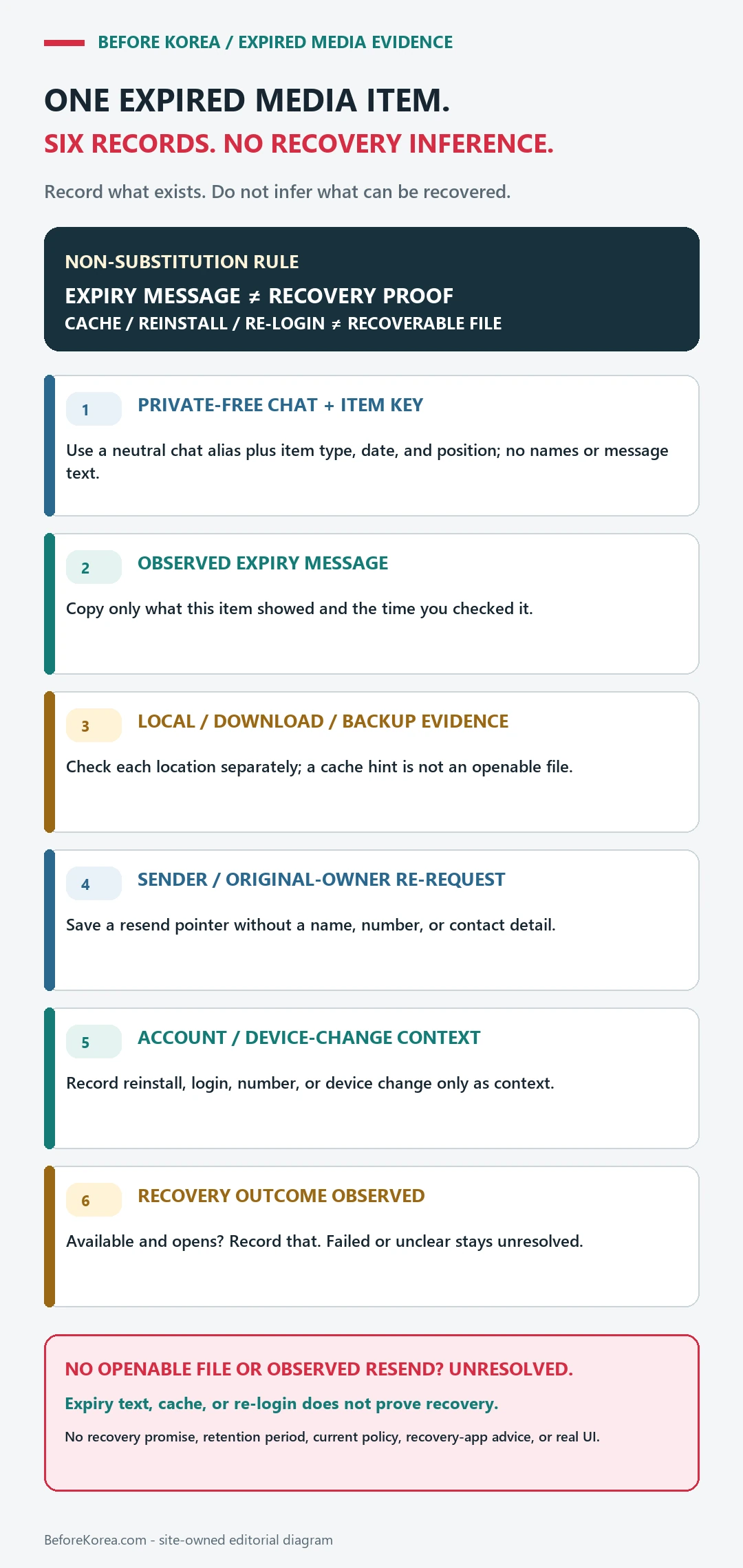
First, identify the one file you need
Write down the chat name without exposing private contact details, the approximate date, file type, visible filename or thumbnail, and who originally sent it. This prevents you from mistaking a lower-quality screenshot or a different attachment for the missing original.
- Photo: note the scene, approximate date, and whether the original resolution matters.
- Video or voice note: note duration and the sender.
- Document: note the filename, extension, version, and expected sender.
- Receipt, ticket, or form: ask the issuing business for a fresh official copy when possible.
Search existing copies before changing the app
| Place | What to search | What it proves |
|---|---|---|
| Phone Gallery or Photos | Date range, KakaoTalk album, screenshots, recently deleted folder | Only that a local image or video copy exists |
| Files or Downloads | Filename, extension, date, document folder, KakaoTalk folder | Only that a downloaded local file exists |
| Desktop KakaoTalk computer | Configured download folder and file-history search | Only that this computer saved a copy |
| Old phone or tablet | Local media without logging out, resetting, or updating first | Only that the old device retains a usable copy |
| Sender or another participant | Their original file or saved copy | A resend route exists if they still have it |
Open any candidate file and check that it is complete. A thumbnail, cache trace, filename, or chat bubble is not the same as a recoverable original.
Know what Kakao’s standard chat backup does not include
Kakao’s current English chat backup and restore instructions say that the standard backup covers text history but excludes photos, videos, text messages over 1,000 characters, secret-chat messages, and open-chat messages. The same official page says the backup can be restored within 14 days and is permanently deleted after that backup period.
Those facts matter because “I backed up KakaoTalk” does not prove that an expired photo or video was backed up. They also do not prove that every local copy is gone. Search the device and ask the sender before making a destructive change.
Do not start with reinstalling, clearing data, or changing numbers
- Do not clear app storage or cache as a recovery experiment. It can remove local material without restoring the expired file.
- Do not uninstall first. Confirm the Kakao Account, registered phone number, backup date, backup password, and the limits of the backup before any reinstall.
- Do not change the registered number during the search unless necessary. Account verification and file recovery are separate problems.
- Do not pay a random “Kakao recovery” service or provide a verification code. A third party cannot prove access to Kakao’s servers and may be collecting account or payment data.
Ask the sender for a useful resend
A precise request is faster than “send that old photo again.” Use a message like this:
KakaoTalk says the media storage period expired for the file sent around [date] in [chat]. It was the [photo/video/document] showing [non-private description]. If you still have the original, please resend it as a file or original-quality media.
If the item is an official reservation, receipt, medical document, ticket, or form, contact the business or institution that issued it. A fresh official copy may be more reliable than recovering a chat attachment.
When Kakao Customer Service is the right route
Use the official KakaoTalk Customer Service page when the problem includes account login, phone-number verification, backup and restore, device transfer, or a paid Kakao feature. Provide facts, not passwords or verification codes.
- Phone operating system and model
- KakaoTalk app version
- Whether the message appears on one or multiple devices
- Approximate message date and file type
- Whether a standard chat backup exists and its date
- What local folders and sender-resend routes were already checked
Protect private information during recovery
Do not post the chat, phone number, Kakao ID, QR code, backup password, verification code, or full identity document in a public forum. Redact names and account details from screenshots sent to support unless the official case specifically requires them. Use Kakao’s own help domain rather than a link supplied by an unknown recovery account.
FAQ
Can expired KakaoTalk media always be recovered?
No. A usable copy may exist on a device, computer, sender’s device, or a separate backup, but the expired chat download itself may no longer be available. Treat recovery as unconfirmed until the intended file opens.
Will standard KakaoTalk chat backup restore old photos and videos?
Kakao’s current standard backup instructions explicitly exclude photos and videos. Check the official instructions for the version and feature you use rather than assuming all chat content is included.
Should I reinstall KakaoTalk?
Not as the first recovery step. Reinstall only for a documented account or restore procedure after confirming account access, the backup date and password, what the backup contains, and which local data could be lost.
For setup, verification, and registered-number preparation, use the broader KakaoTalk Korea guide for foreigners.
Kakao Customer Service guidance rechecked August 14, 2026. App features and backup terms can change; use the current official help page before changing devices or reinstalling.