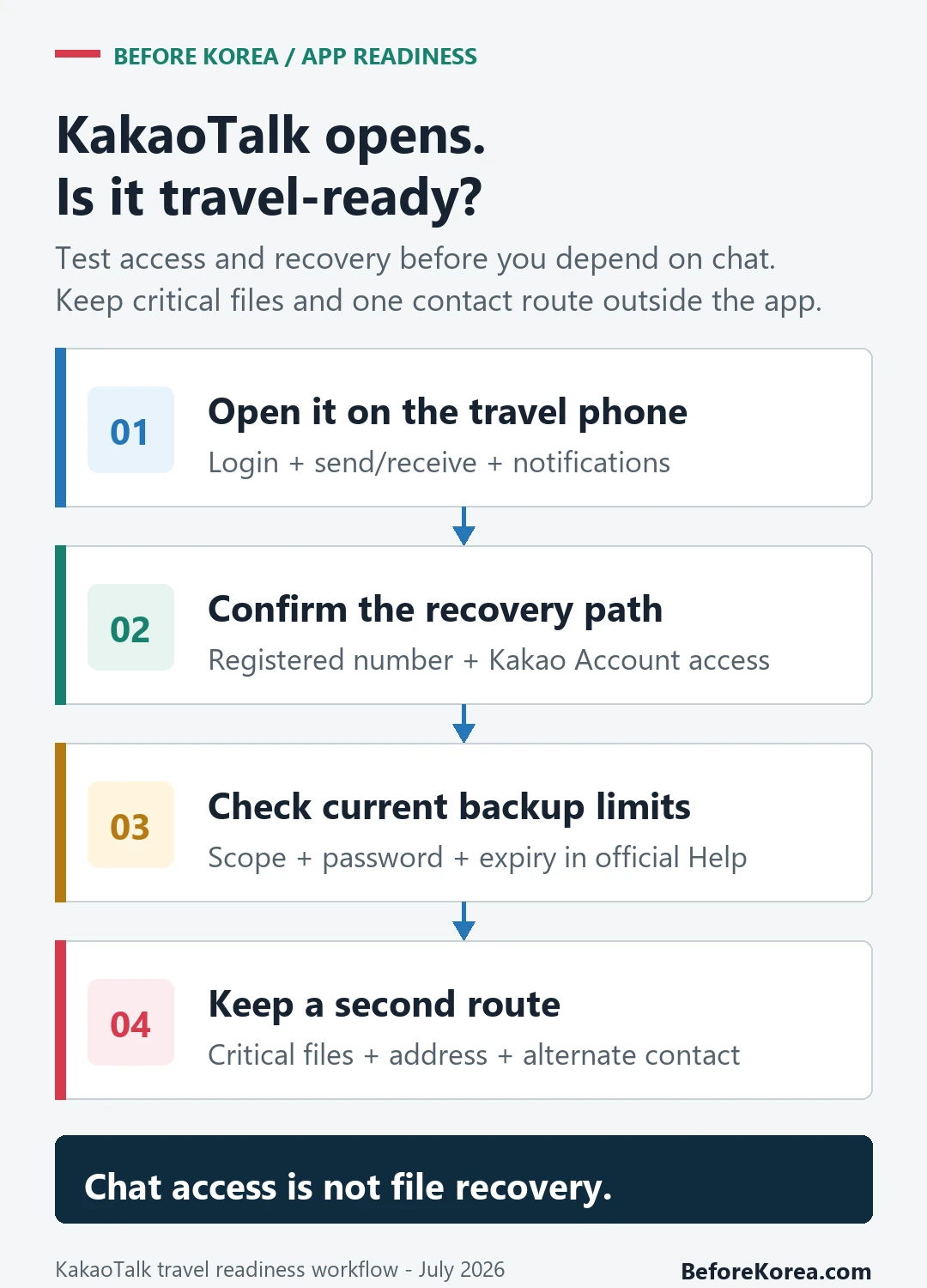
Foreigners can use KakaoTalk in Korea. Before relying on it for a hotel, clinic, or reservation, test login, message delivery, notifications, and account recovery on the phone and number you will carry. Keep a phone number, email, or booking-platform message route outside KakaoTalk as a backup.
Test KakaoTalk login, messages, and recovery
Use KakaoTalk Help for current KakaoTalk account, backup, and recovery instructions. Test the account while the registered phone number and recovery options are still available.
- KakaoTalk Help
- VISITKOREA
- Official KakaoTalk service page
- KakaoTalk on Google Play
- KakaoTalk on the App Store
- Kakao Customer Service
Keep access to the registered number and a second contact route
Keep access to the registered number, recovery email, password, device storage, notification settings, and one contact method outside KakaoTalk.
- Registered phone number
- Login and recovery access
- Message and notification test
- Backup contact method
Foreigners can use KakaoTalk, but setup depends on phone verification, app-store access, and account recovery options. It is not a resident-only app, but losing access to the verified number can make recovery difficult.
If the exact message says “media storage period has expired,” use the dedicated expired-media recovery checklist: check local downloads and the original device, ask the sender to resend, and review backup limits before reinstalling or changing the account. A working login does not recreate a file that is no longer available from the chat.
Check the account on the phone you will carry
- Install or update KakaoTalk from the official store and confirm that the existing account opens normally.
- Send and receive a test message, open a shared location or file, and check that notifications arrive.
- Review the registered phone number, recovery route, chat-backup limits, and device-storage settings before changing phones or SIMs.
- Save hotel, clinic, reservation, and emergency details outside the chat so an account or file-expiry problem does not remove them.
- Give important contacts an alternate phone number, email address, or booking-platform message route.
First identify which Kakao check failed
A KakaoTalk signup SMS, Kakao Account two-step verification, and a user-protection restriction are different checks. Kakao describes the signup SMS code as identification when registering KakaoTalk. Two-step verification comes after Kakao Account and password login. Use the configured KakaoTalk or contact-number method; if you previously added an emergency email, use it when your phone is unavailable.
A protection warning is not another signup-code request. Kakao says usage limits or protection measures may be applied when abnormal use environments or patterns are detected. Talk Safety Pass can relax some measures only for Kakao Certificate users registered with a South Korean +82 number, and restrictions may be reapplied.
Read the exact label before retrying. If the signup SMS is missing, troubleshoot that registration step. If two-step login fails, use a configured fallback. If the screen reports a protection measure, follow Kakao’s protection guidance or the Customer Center link on that official page. Never use or share another person’s verification code.
A working chat screen does not restore every old file
KakaoTalk is travel-ready when login, messages, notifications, and recovery have been tested on the device being carried. Opening the home screen alone does not prove that an old file can be restored or that account recovery will work abroad.
| Check before signup | Why it matters | What to do |
|---|---|---|
| Registered number and recovery | Account confirmation or later recovery may depend on details tied to the account. | Test login and recovery while the registered number and recovery route are available. |
| Message and contact method | A hotel or business may use a phone number, Kakao ID, QR code, or link. | Ask which method they use and send a test message before the appointment. |
| Notifications | Silent or blocked alerts can hide a time-sensitive message. | Enable alerts and test them on the phone you will carry. |
If login, messages, or an old file fail
Separate an account-access problem from an expired or deleted media file. Logging in again may restore the account but cannot recreate a file that is no longer stored.
Use KakaoTalk Help for the exact error and ask the sender to resend critical material; move essential travel details to a second channel.