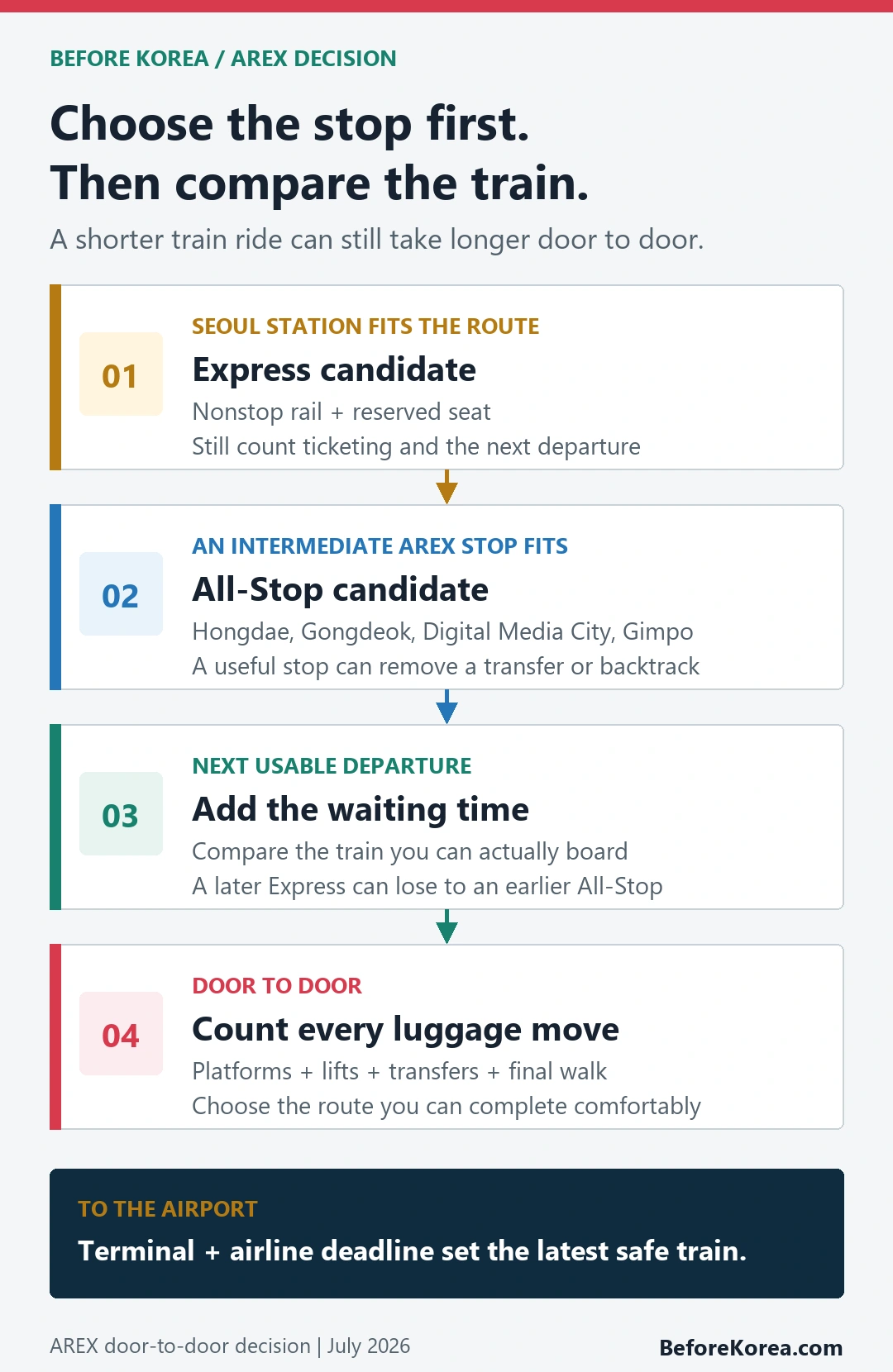
Take the AREX Express when Seoul Station is the right rail stop for your trip and the next Express departure saves time after ticketing and waiting. Take the All-Stop Train when an intermediate station such as Hongik University, Gongdeok, Digital Media City, Magongnaru, or Gimpo Airport gives you an easier connection. The word “Express” describes the train segment, not the entire trip from your hotel door to the correct airport terminal.
Both services run between Seoul and Incheon International Airport Terminals 1 and 2. They use different stopping patterns, tickets, seating, and departure intervals. Compare the next train you can actually board, the station you can reach with luggage, and the transfer after the train. That is more useful than comparing headline journey times alone.
Checked July 23, 2026 against the current English-language AREX customer site and Incheon Airport transport pages. Timetables, fares, terminal assignments, service notices, and ticket rules can change, so repeat the official check on your travel day.
Choose by your Seoul stop, not the word Express
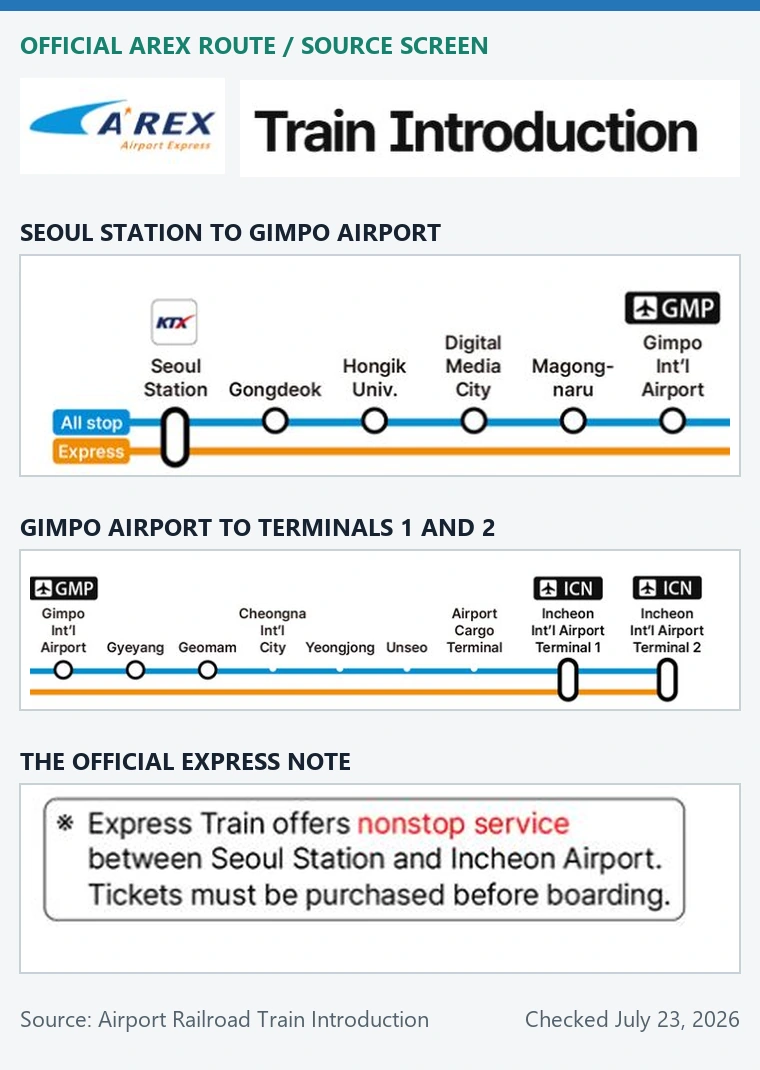
The most important question is simple: where do you need to be after you leave the airport train? The Express runs nonstop between Seoul Station and the two airport terminals. The All-Stop Train serves the intermediate airport-line stations and their subway transfers. A traveler staying near Hongdae can lose the Express Train’s rail-time advantage by riding past Hongik University to Seoul Station and then doubling back.
| Your Seoul route | Start with | Why |
|---|---|---|
| Seoul Station, a nearby hotel, KTX, Line 1, or Line 4 | Compare Express first | Its nonstop endpoint may fit the rest of the journey |
| Hongdae or a Line 2 connection | Compare All-Stop first | Hongik University is an intermediate AREX station |
| Gongdeok, Digital Media City, or Magongnaru | Compare All-Stop first | It can remove a backtrack through Seoul Station |
| Gimpo Airport or a connection to Lines 5 or 9 | Use All-Stop | The Express does not stop at Gimpo Airport |
| Hotel far from any useful rail station | Compare bus or taxi | A direct road route may involve fewer luggage moves |
If you have not chosen a Seoul area yet, the airport-to-hotel-area guide explains which transport stops are useful for common visitor districts. If you are comparing train, bus, and taxi from scratch, use the broader Incheon Airport to Seoul guide.
What the two AREX services actually do
The official Express Train introduction describes a nonstop service between Seoul Station, Incheon Airport Terminal 1, and Terminal 2. It currently lists reserved seating, a separate ticket, onboard crew service, Wi-Fi, and other Express-only amenities. The same page displayed an adult fare of KRW 13,000 and full-ride estimates of 43 minutes between Terminal 1 and Seoul Station and 51 minutes between Terminal 2 and Seoul Station when checked for this guide.
The official All-Stop Train introduction describes a metropolitan rail service connected to the Seoul subway through intermediate transfer stations. It displayed full-ride estimates of 59 minutes from Terminal 1 to Seoul Station and 66 minutes from Terminal 2, with a note that some trains may take another two to six minutes. Those numbers compare trains already in motion; they do not include reaching the platform, waiting, buying a ticket, or continuing to the hotel.
| Detail | AREX Express | AREX All-Stop |
|---|---|---|
| Stops | Seoul Station, Terminal 1, Terminal 2 | Seoul Station, airport terminals, and intermediate AREX stations |
| Seating | Reserved seat on the selected service | Metropolitan-train seating; a seat is not guaranteed |
| Ticket | Separate Express ticket purchased before boarding | Single-journey card or supported prepaid transportation card |
| Best fit | Seoul Station route, predictable seat, lighter transfer plan | Intermediate station, subway connection, lower-cost local rail route |
| Main trap | Waiting for the next departure or backtracking from Seoul Station | More stops, possible standing, and more attention to the train’s destination |
Fares and schedules are not permanent facts. Use the figures above to understand the difference, then use the live official pages for the journey you will make. A screenshot from an older travel blog should never overrule the current ticket screen or station display.
From Seoul, work backward from the airline deadline
For a train to Incheon Airport, the deadline is not the flight departure time. Start with the airline’s current check-in or bag-drop cutoff and the terminal on your e-ticket. The Incheon Airport departure page warns that terminal assignments can differ because of codeshares or airline circumstances and tells passengers to confirm the actual terminal through the e-ticket or flight search.
- Confirm Terminal 1 or Terminal 2 from the airline, e-ticket, or current airport flight information.
- Write down the airline’s check-in and bag-drop deadline, not only the scheduled departure.
- Choose the Seoul boarding station and time the trip from your actual hotel entrance with luggage.
- Check a specific train that reaches the correct terminal before your airport buffer begins.
- Move one train earlier if a missed local connection would leave no comfortable recovery option.
There is no honest universal instruction to leave exactly two or three hours before a flight. An international traveler checking bags, a passenger with completed mobile check-in, a family moving several suitcases, and someone using Seoul Station City Airport Terminal do not share the same sequence. Use the airline’s deadline and your own airport tasks, then add a disruption margin you can live with.
From the airport, compare the next train you can board
After landing, do not plan from the scheduled arrival time. Immigration, baggage claim, customs, a delayed bag, a restroom stop, and the walk to the Transportation Center all happen before you can board. Open the official AREX search only after you know your terminal and have a realistic platform-arrival time.
| Compare | What to measure |
|---|---|
| Next usable departure | The first train you can reach after immigration, bags, ticketing, and the station walk |
| Final Seoul stop | The station that creates the simplest route to the exact accommodation |
| Waiting plus riding | A later Express can lose to an earlier All-Stop even if its ride is shorter |
| Transfer burden | Platforms, lifts, stairs, crowded cars, and street distance with every bag |
| Late-arrival backup | Airport bus or official taxi route if the rail option is ending or disrupted |
The Incheon Airport Railroad Guide shows where the rail ticket facilities are located in the Terminal 1 and Terminal 2 Transportation Centers and directs travelers to AREX for current fares and schedules. Follow airport signs for Airport Railroad rather than relying on a saved terminal photo, because construction routes and counter locations can change.
Use the live timetable without copying stale times
Open the official AREX customer site, set the language to English, and enter the departure station, arrival station, date, time, and passenger count. For the Express, the official timetable page also lists Terminal 2, Terminal 1, and Seoul Station times in both directions.
Read the departure in the results, not only the time you entered. In an AI-operated check of the official English booking site on October 8, 2026, a hypothetical search for October 15 from Seoul Station to Terminal 2, starting at 04:00 for one adult, returned A1001 departing at 06:00 and arriving at 06:51 as its first displayed result. The input time did not establish a 04:00 service. Repeat the search for your date and compare the listed arrival with your airline deadline before choosing a train.
If your station is Hongik University or Gimpo Airport, changing the Express search time will not add that stop: its selector offered only Seoul Station and the two airport terminals. Use the All-Stop route for intermediate stations, then check its current destination and departure separately.
- Read the date: weekday, weekend, holiday, maintenance, and special-event schedules can differ.
- Read the destination: do not assume every All-Stop train shown on a platform board runs to the same terminal or endpoint.
- Read the terminal: Terminal 1 and Terminal 2 are separate stops.
- Read service notices: a normal timetable does not cancel a live disruption or maintenance notice.
- Save a backup: note one earlier train and one road option instead of building the entire airport plan around the last comfortable departure.
If a search result and the station display disagree, follow the current station display and staff instruction. The web page is a planning tool; the platform information controls the train in front of you.
Buy the ticket that matches the service
Express and All-Stop are not two names for the same ticket. The official Express page says tickets must be purchased before boarding, and its current customer site offers train search and ticketing. The All-Stop page says riders can use a single-journey card from a station machine or a prepaid transportation card. Do not tap through an All-Stop gate and expect that action to create an Express reservation.
The online reservation screen stated a 20-minute predeparture reservation cutoff and payment within 20 minutes of reserving. A listed train or reservation is not proof of a paid, issued ticket. If a timing change becomes necessary, read the current Express terms. For tickets purchased directly through AREX’s website or app, refund requests use the online channel before departure and the Express customer-service-center channel afterward, subject to fees and ticket-use/validity conditions. This does not establish the refund instructions for reseller vouchers. Do not treat a different deadline in the general terms as permission to wait beyond the online screen’s cutoff. This check stopped before reservation, payment and refund execution.
- For Express, match the travel date, direction, terminal, train, passenger count, and seat before payment.
- For All-Stop, make sure the transportation-card balance covers the trip before entering the gate.
- Keep the QR code or ticket accessible without depending on weak station data service.
- Never publish or send a screenshot that shows the full ticket code, account details, payment information, or passport data.
If a discount is important to the decision, verify the eligibility and final price on the official checkout screen. Affiliate prices, promotions, and bundled offers can change and may have conditions that a headline does not show.
Count the luggage moves after the train
Rail travel feels simple on a map because every transfer is one dot. With a suitcase, that dot can mean leaving a platform, finding a lift, crossing a concourse, entering another gate, boarding a crowded train, and walking uphill from the final exit. Count each time you must lift, roll, or watch the bag.
| Luggage situation | Route implication |
|---|---|
| One carry-on and a hotel near Seoul Station | Express can be a clean, seated route |
| Hotel near Hongik University with manageable bags | All-Stop can avoid a Seoul Station backtrack |
| Several large suitcases or a stroller | Compare lifts, transfer distance, bus luggage handling, and taxi door access |
| Late night, tired group, or young children | A direct road option may be worth more than a shorter rail segment |
| Mobility limitation | Check current accessible paths at every planned station, not only train access |
For the rest of Seoul’s subway journey, use the Korea subway and bus guide. It covers the local transport steps that begin after the airport train comparison ends.
Know when the bus or taxi is the better route
AREX is not automatically the best airport transfer. An airport limousine bus can be easier when it stops close to the hotel and handles the long middle section without subway transfers. A taxi can make sense for a group sharing the fare, an address far from useful rail stops, very late or early movement, or luggage that would be difficult to manage through stations.
- Use the Korea airport bus guide to check the exact stop, direction, ticket method, last service, and hotel walk.
- Use the Korea airport taxi guide to compare official pickup, fare evidence, late-night conditions, and destination handling.
- Keep the hotel name, Korean address, phone number, and map pin available offline whichever mode you choose.
The right route is the one that reaches the correct door or terminal with a margin you understand. A faster published train time is not useful if it adds a long wait, a wrong-direction transfer, or a final walk you cannot comfortably make.
Questions travelers ask
Does the AREX Express stop at Hongdae or Gimpo Airport?
No. The official route shows the Express running nonstop between Seoul Station and Incheon Airport Terminals 1 and 2. Use the All-Stop Train for Hongik University, Gimpo Airport, and the other intermediate AREX stations.
Is the Express always faster?
Its train ride between Seoul Station and the airport is faster, but the door-to-door trip may not be. Include the wait for the next departure, ticketing, travel to Seoul Station, and the transfer after arrival.
Can I use a transportation card on the Express?
Do not assume a normal transit-card tap is an Express ticket. The official AREX page says the Express requires a ticket purchased before boarding. The All-Stop service accepts a single-journey card or supported prepaid transportation card.
Do both trains serve Terminal 1 and Terminal 2?
Yes, both official route descriptions include both airport terminals. Confirm your airline’s terminal and make sure the train or direction shown on the live display reaches it.
Where should I check the first or last train?
Use the current AREX customer site or station timetable for the exact date and direction, then recheck service notices and the station display. Do not plan a flight around a first- or last-train time copied from an undated article.
Primary sources checked July 23, 2026: AREX customer site, Express Train introduction, All-Stop Train introduction, Express timetable, Incheon Airport Railroad Guide, and Incheon Airport terminal guidance.