For a first trip in Seoul, install Seoul Subway – Official and one local map app such as NAVER Map or KakaoMap. Use the Seoul Metro app to inspect the rail route and station information, then use the map app to confirm the place listing, exit, and final walk to the correct entrance. Add KakaoMetro when you want a subway-focused second opinion or are comparing subway systems in other supported Korean cities. No single app should be trusted until it completes one route you will actually take.
Last checked: July 22, 2026. App availability, screens, permissions, and route data can change, so use the verified publisher links below and run the test again shortly before departure.
Choose the app by the part of the trip it must solve
The phrase “best subway app” hides three different jobs: planning the train ride, reading station details, and reaching a venue after the exit. Choose a tool for each job instead of treating four apps as interchangeable.
| App | Start with it when | Check before relying on it |
|---|---|---|
| Seoul Subway – Official | You want Seoul Metro route, train, congestion, exit, restroom, or station guidance from the official operator | Confirm that the route and station you need are covered and review the permissions requested on your phone |
| KakaoMetro | You want a dedicated subway map, route comparison, or exit-near carriage information across its supported cities | Check the current city coverage, timetable, transfer, and platform direction for the exact trip |
| NAVER Map | You need Korean place search, public transit, walking directions, or the final destination pin | Match the Korean name, district, station, exit, and entrance rather than accepting the first English result |
| KakaoMap | You want another local place and route result to compare with NAVER Map | Confirm the same destination pin and the same side of the station before following the walk |
Install from the verified publisher page
Search results can show similarly named subway apps. Verify both the app name and developer before installing. Seoul’s official transport page says the Seoul Subway app has been provided for international visitors since April 2023, and the current store listings identify Seoul Metro as the developer or seller.
- Seoul Subway – Official: Google Play or Apple App Store. Publisher: Seoul Metro.
- KakaoMetro: Google Play or Apple App Store. Publisher: Kakao Mobility.
- NAVER Map: use the NAVER Corp. store listing or the official store link for your device.
- KakaoMap: use the Kakao Corp. store listing or the official store link for your device.
Store pages also show compatibility and permission information. Read those details on the device you will carry; a listing that exists does not guarantee that every feature works on every operating-system version or in every language.
Test one route from the station to the actual door
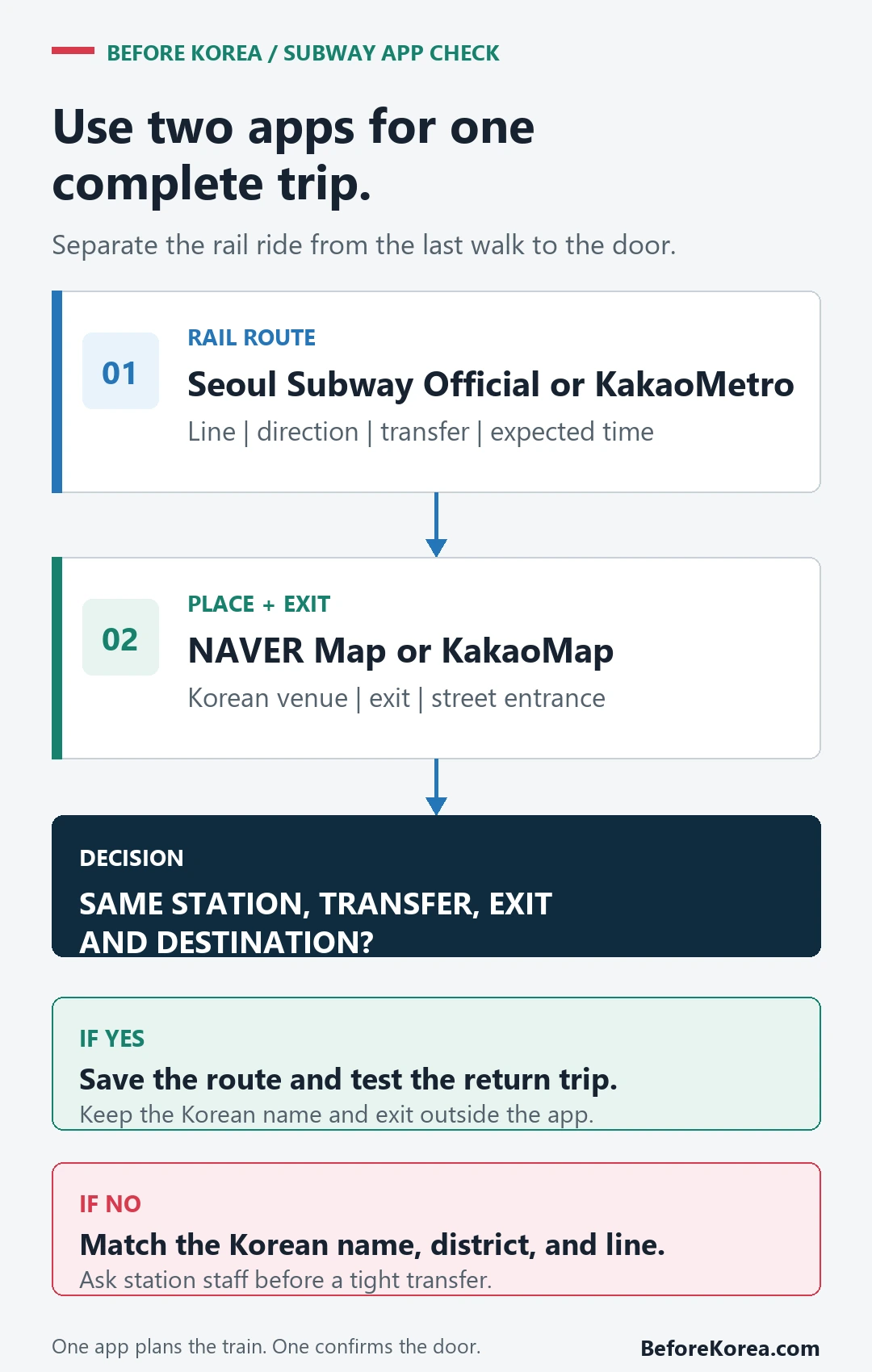
Do not test with “Seoul Station to Hongdae” and stop there. Pick one hotel-to-venue trip from your itinerary. The route should include the place name, rail direction, transfer, exit, and final street walk.
- Save the origin and destination in both English and Korean. Copy the Korean name from the hotel, venue, or verified listing.
- Search the route in the subway app and note the line, direction, transfer station, number of stops, and expected arrival time.
- Open the transfer details. Check the next line and direction rather than memorizing only a line color.
- Open the same destination in NAVER Map or KakaoMap. Confirm the exit and walk to the correct entrance, not merely the neighborhood.
- Reverse the route for the return trip and check it at the time you expect to travel. Late service and a missed connection can change the practical answer.
- Save a screenshot or note outside the app with the Korean destination, transfer, exit, and a second route.
Read the route screen as a checklist
An app result is useful only when you can explain the route back to yourself. On the route screen, find the travel time, stop count, transfer count, departure and arrival times, line direction, fare display, exit, and any walking segment. If one of those details is missing, use the second app or station information before the trip becomes urgent.
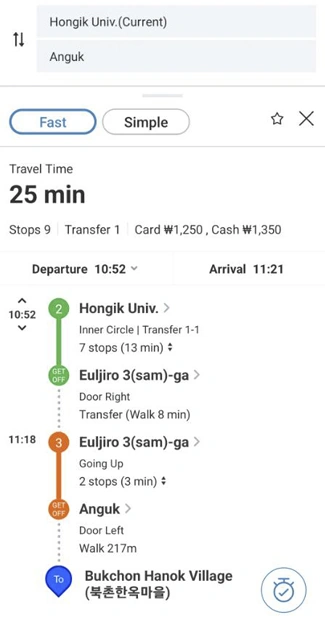
The official Seoul announcement shows the Seoul Subway app combining a rail route with a final walking segment. The interface may look different now, but the reading task is the same: verify every handoff from origin to train, transfer, exit, and destination. Read the Seoul Metropolitan Government app announcement and the city’s current public-transport overview for the operator’s stated features.
Use KakaoMetro when the subway itself is the question
The current KakaoMetro store listing describes subway maps for the Seoul metropolitan area, Busan, Daegu, Gwangju, and Daejeon. It also describes route search and carriage information for reaching an exit more efficiently. That makes the KakaoMetro app a useful subway-focused comparison, especially when your trip is not limited to central Seoul.
It is still not the final place check. A carriage recommendation can help you reach the ticket gate, but it does not prove that the venue pin, street entrance, opening hours, or walking path is correct. Move the destination into NAVER Map or KakaoMap before leaving the station.
Let a local map app handle the exit and final walk
NAVER Map’s current store listing includes place, bus, subway, transit, and navigation search. KakaoMap’s listing includes public-transit and walking routes, place search, and a subway map. Those tools overlap, but the practical test is whether each one finds the same Korean destination on the correct side of the station.
If an English search gives several similar results, paste the Korean name and compare the district, road address, nearby landmark, and station exit. The separate Kakao Map vs NAVER Map comparison covers that choice in more detail, while the NAVER Map setup guide focuses on saving places before arrival.
Know what a route result does not prove
| What the screen shows | What still needs a check |
|---|---|
| A suggested train route | Current disruption, platform direction, and whether the connection still works at your travel time |
| A fare or travel-time estimate | The ticket or transit card you will use and the margin needed for walking, queues, and luggage |
| An exit number | The correct side of the station, elevator or escalator needs, and the actual venue entrance |
| A destination pin | The Korean name, district, building, floor, and whether the listing is still current |
| An installed app | Data access, battery, permissions, language settings, and an offline note if the phone fails |
When two apps disagree, slow down at the handoff
First check whether both apps selected the same station, branch, and Korean destination. Then compare the travel time at the same departure time. At the station, current signs and service announcements take priority over an old screenshot. For a time-sensitive transfer, ask station staff while there is still room to change the route.
A simpler route with one clear transfer can be better than a theoretically faster route with two tight transfers, a long platform walk, or the wrong exit for luggage. The goal is not to make both apps agree; it is to identify which difference affects the trip.
Keep a backup that does not depend on the same app
- Korean name and address of the hotel or venue
- Line, direction, transfer station, and destination exit
- A route screenshot saved outside the app
- A second local map or subway result
- Enough battery and data for the final walk
For the ride itself, continue with the Korea subway and bus guide. For the larger phone setup, use the Korea travel apps guide.
Questions travelers still ask
What is the best subway app for Korea?
There is no single winner for every trip. In Seoul, start with Seoul Subway – Official plus NAVER Map or KakaoMap. Consider KakaoMetro when you want a subway-only comparison or are using another city listed in its current coverage.
Is Seoul Subway really an official app?
Yes. Seoul’s official announcement says the app was released by Seoul Metro, and the current Google Play and Apple listings identify Seoul Metro as the developer or seller. Match those publisher details before installing.
Is KakaoMetro enough for the final walk?
Use it for the subway route and station decision, then open the exact venue in NAVER Map or KakaoMap. The exit is only the start of the street-level navigation.
Should I install the apps before arriving?
Yes. Confirm compatibility, language settings, permissions, and one real route while you still have reliable data and time to replace an app that does not work for your phone or itinerary.
Sources checked July 22, 2026: Seoul Metropolitan Government transport and app pages; current Google Play and Apple App Store listings for Seoul Subway – Official, KakaoMetro, NAVER Map, and KakaoMap. Recheck the publisher pages and the exact route before travel.
Check the final transfer, not just the first train
For a late concert, a route is usable only if every transfer remains available after the show, exit queue and walk back to the station. Check the route to the actual hotel entrance, save the last feasible connection and prepare an alternate station or taxi pickup before doors open.
| Route check | Record | Fallback trigger |
|---|---|---|
| Show finish plus exit queue | A realistic station-entry time | The crowd or organizer changes the exit flow |
| Venue station departure | Direction and train destination | Nearest station is closed or bypassed |
| Final transfer | Transfer station and last usable connection | The first train runs but the connection does not |
| Hotel final walk | Correct exit and Korean address | Station exit or road is restricted |
Use the Seoul Metropolitan Government public-transportation guide to find the Seoul Subway app and its route and station features, then check Seoul TOPIS and the city or organizer notice for event-day transport changes.
A timetable checked earlier does not guarantee boarding after a crowded event. Temporary station bypasses, closed entrances and delayed crowd release can change the workable route.
Last checked: August 7, 2026. Recheck every connection on the event date.