NICE*BAEMIN is not enough by itself to identify fraud or confirm an authorized Baemin order. If the words appear on a card statement, investigate a payment descriptor. If NICE appears inside a phone or account-verification screen, investigate an identity check. Match the exact amount, date, status, order, and official service path before deciding what happened.
This guide was rechecked on August 6, 2026. NICEPAY’s official pages explain why NICE can appear in payment records and provide a transaction lookup. NICE ID separately describes Korean mobile-phone identity verification. Those sources do not prove that every NICE*BAEMIN entry is authorized, that “SEOUL” identifies a physical store, or that every Baemin verification screen uses NICE.
| What you saw | What it can establish | Next check |
|---|---|---|
| NICE*BAEMIN or NICE*BAEMIN SEOUL on a card record | A payment descriptor exists; it does not establish authorization | Match the original KRW amount, date, status, and Baemin order |
| NICE during app or phone verification | A verification step may have opened; it is not a card-charge explanation | Restart from the official app and confirm the step you initiated |
| No matching order or approval record | The event remains unexplained | Use official Baemin, NICEPAY, and card-issuer support routes |
Decide which NICE event you actually saw
Start with the location of the words, not the familiar brand fragment. Save a record without publishing or sending sensitive details.
- Card statement or banking app: record the complete descriptor, amount, currency, transaction date, and whether it is pending, reversed, declined, or posted.
- Baemin checkout or order history: record the order number, restaurant or store, total, payment method, cancellation, and refund status.
- Phone or identity screen: record the app path that opened it and the type of information requested, but never capture a password, one-time code, full card number, resident number, or passport number.
- SMS, email, or browser link: do not enter information. Open the official app or type the official address yourself.
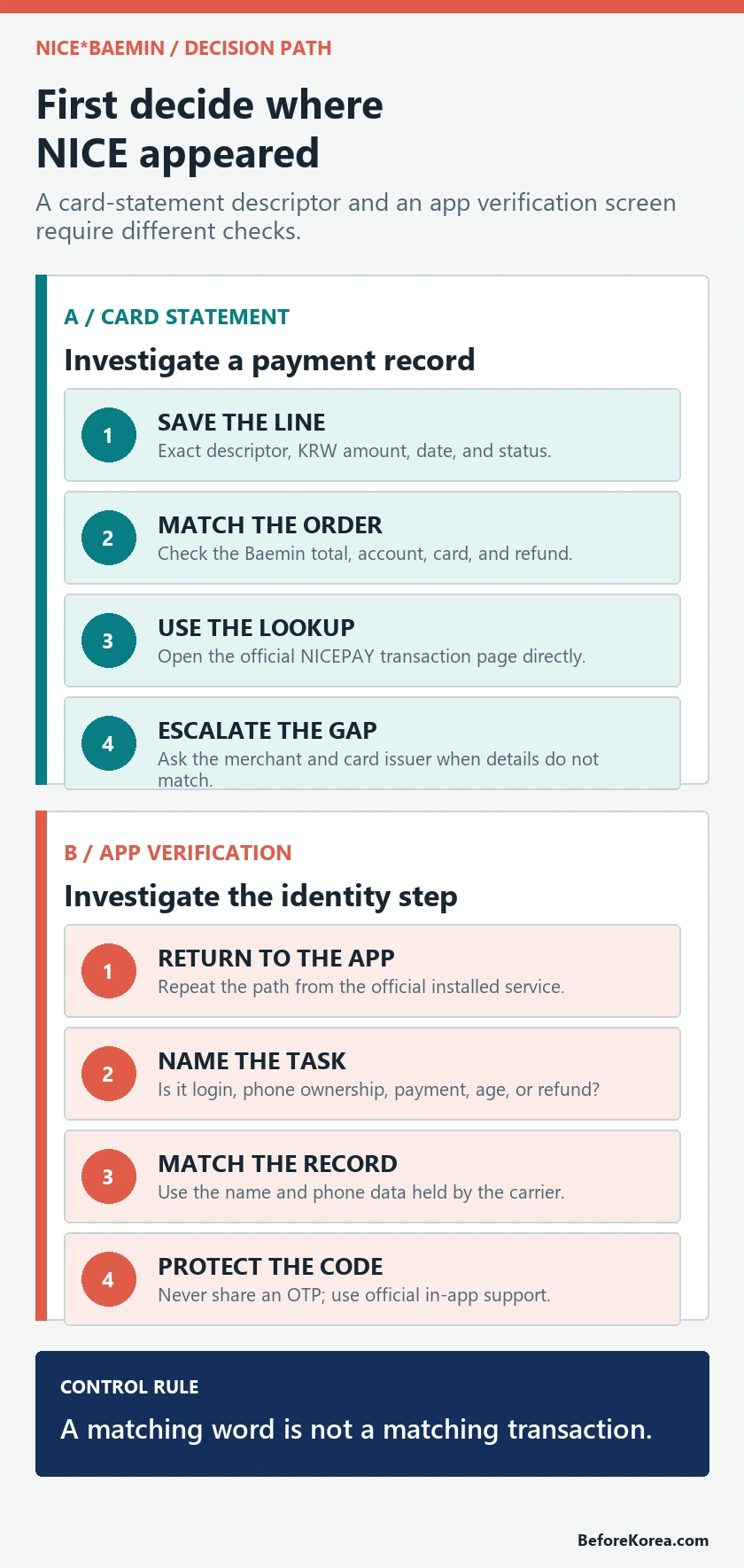
A card descriptor and a verification provider can share the word NICE while representing different companies and processes. Do not use a payment explanation to approve an identity screen, or an identity explanation to dismiss an unrecognized charge.
If NICE*BAEMIN is on a card statement
Treat it as an unresolved transaction until you can connect it to a real order or payment event. The descriptor may contain a payment processor, a merchant name, or both, and the card issuer may format it differently from the receipt. That makes a processor-plus-merchant explanation plausible, but it does not authenticate the charge.
- Copy the descriptor exactly, including punctuation and any phone number or location.
- Check the KRW amount and the card issuer’s converted amount separately.
- Compare the transaction time with Baemin orders, failed checkouts, duplicate taps, cancellations, and refunds.
- Check every Baemin account, device, and authorized card user that could have placed the order.
- Keep the card issuer’s approval number if the banking app provides one.
- Use the official merchant, payment-provider, and issuer routes in that order when no match appears.
A pending item can later post, reverse, or change its final description. Record the status and ask the issuer what it means for that card. Do not wait past the issuer’s fraud-reporting or dispute deadline simply because the merchant name looks familiar.
For an overseas card, compare the merchant-currency amount in KRW before comparing the converted amount in your home currency. Exchange rates and foreign-transaction fees can make the second number look unfamiliar even when the underlying purchase matches. If the banking app does not show the original KRW amount, ask the issuer for it. A valid match should still lead back to a specific order, not merely to a similar converted total.
Why NICE can appear beside a merchant name
NICEPAY’s official credit-card service page describes two merchant arrangements. For an agency merchant, it says the customer’s card statement can show NICEPAY. For an intermediary merchant, it says the contracted merchant name is shown according to the card-company agreement. NICEPAY handles payment functions such as authorization, acquisition, and settlement for merchants.
This explains why a processor name can appear on a statement, but it does not publicly map the exact text NICE*BAEMIN to a particular order. Only a matching transaction record, merchant response, and card-issuer record can do that. Do not label the charge safe from the descriptor alone.
Match the charge before treating it as explained
A convincing match uses several independent details. One matching word is weak; the same amount, date, order, and payment status together are much stronger.
- Amount: compare the exact KRW total, including delivery fee, service fee, discount, coupon, and any later refund.
- Date and time: allow for the issuer’s time zone and posting date, but do not force a distant order to fit.
- Order: open Baemin order history and verify the store, items, delivery address, and payment method.
- Status: distinguish an authorization hold, posted purchase, reversal, partial refund, and full refund.
- Card: confirm which physical card, mobile wallet token, or authorized user was involved.
- Reference: preserve the Baemin order number, issuer approval number, support case number, and response date.
If the order total and statement amount differ, check whether a coupon, card discount, refund, or exchange-rate conversion explains the difference. If the underlying KRW amount still does not match, keep investigating.
Work from records in this order: Baemin order history, the issuer’s transaction details, the payment provider’s official lookup, and then support responses. This keeps one weak clue from becoming the conclusion. It also helps when a canceled order produces both a temporary authorization and a later reversal: record each line separately and ask the issuer whether they belong to the same approval.
Use the official NICEPAY lookup only when the details fit
NICEPAY provides an official credit-card transaction lookup. The Korean labels include approval number (승인번호), payment date (결제일자), buyer name (구매자명), payment amount (결제금액), and a security image. The page can search by approval number or card information, with a separate note for BC Card transactions.
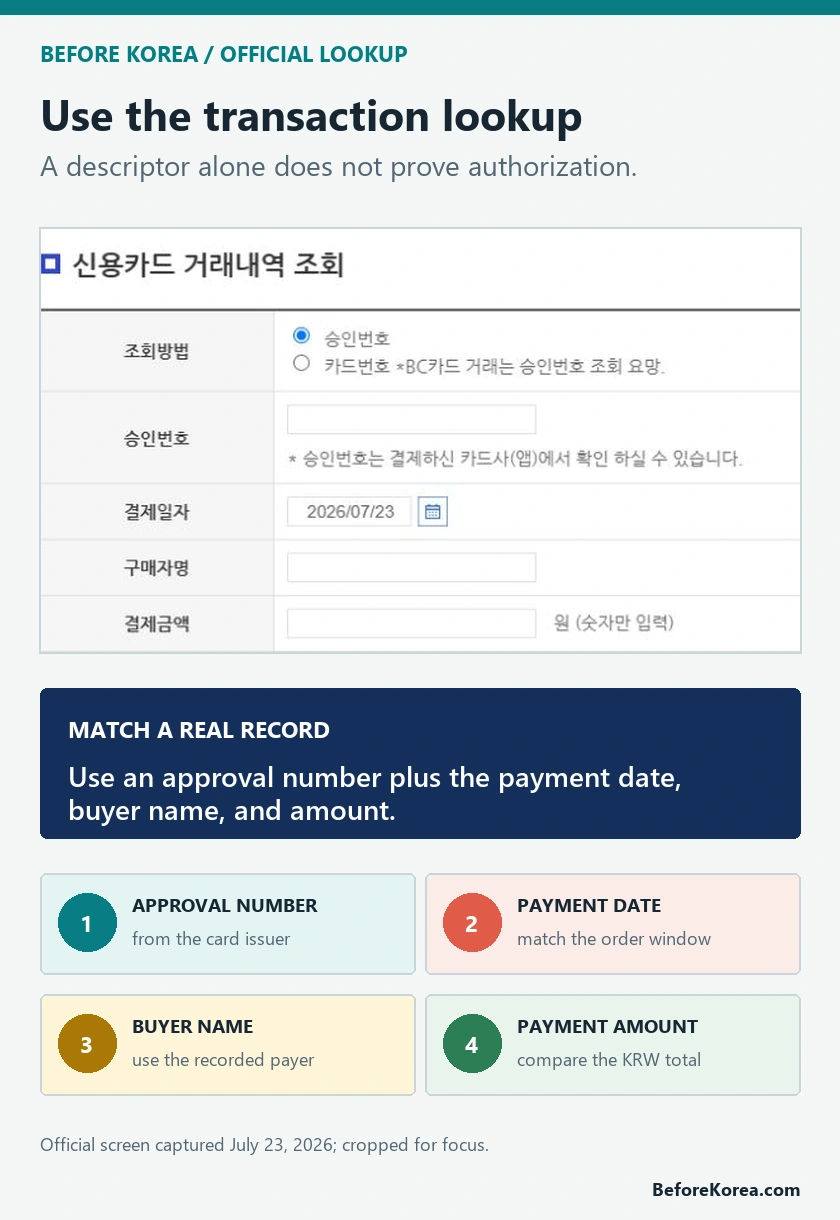
- Open the NICEPAY address directly and confirm the domain is nicepay.co.kr over HTTPS.
- Use the approval number shown in the card issuer’s official app when that method is available.
- Enter information only on the official lookup, never on a copied form, search ad, message link, or support chat.
- Save the returned merchant name, amount, status, receipt, and contact details without sharing card credentials.
- If no record appears, use the NICEPAY payment-customer contact shown on its official site or ask the card issuer to identify the acquiring merchant.
The lookup is useful only for transactions processed through that service. A missing result does not prove the charge is fake, and a found result does not prove that you personally authorized it.
If NICE appears during phone or account verification
NICE ID is a different service from a card-statement descriptor. Its official service list describes mobile-phone identity verification as checking carrier-subscriber information and possession of the phone. Its smartphone-verification page shows inputs such as name, birth date, gender, Korean or foreigner classification, mobile number, and carrier information.
If a NICE-branded screen opens while you are signing in or enabling a Baemin feature, return to the official app and repeat the same path. Confirm that the screen belongs to the step you initiated. Do not assume the screen is legitimate because it contains a NICE or Baemin logo, and do not assume every Baemin verification uses NICE.
A verification failure is not a reason to borrow another person’s identity, buy a pre-verified account, or hand an OTP to someone offering help. Those shortcuts break the link between the account, phone, and payment owner and can make a later refund or fraud report harder. Use the official app’s support route and ask which exact account requirement is failing.
- Start from the installed Baemin app or official Baemin Global page.
- Check whether the task is login, phone ownership, age, payment method, gift, refund, or another regulated feature.
- Read the requested name and phone format before submitting.
- Never give an OTP, password, or verification code to a caller or chat agent.
- If the app loops or the information cannot match, stop and use Baemin’s in-app support rather than repeatedly changing identity details.
What commonly blocks foreign visitors
Korean phone verification usually checks the information registered with the mobile carrier. A foreign passport, overseas card, roaming number, hotel phone, or data-only SIM does not automatically supply a matching Korean subscriber identity.
- the name order, spacing, or spelling differs from the carrier record;
- the foreigner classification or birth date does not match the subscriber file;
- the wrong carrier or MVNO network is selected;
- the Korean number is registered to another person or organization;
- the SIM is data-only, temporary, suspended, or not enabled for identity verification;
- the app feature requires a local payment or identity condition that the account does not meet.
Do not edit names at random until one passes. Ask the mobile carrier how the subscriber information is registered, then enter the same information in the official verification flow. The practical Baemin setup options are explained in Can Foreigners Use Baemin in Korea? and the shorter Baemin for Foreigners guide.
If the charge is still unrecognized
- Lock or freeze the card in the issuer’s official app if the issuer offers that control and the charge appears unauthorized.
- Contact Baemin through the official app or the contact route on the Baemin website, and ask whether the amount and time match an order.
- Use the official NICEPAY lookup or payment-customer channel when the descriptor and issuer details point to NICEPAY.
- Ask the card issuer for the merchant name, country, transaction type, approval number, token or wallet information, and dispute deadline.
- Follow the issuer’s fraud or dispute process and keep the case number.
- Review saved cards, mobile wallets, authorized users, and Baemin account access without sharing passwords or codes.
Canceling a Baemin order and disputing a card transaction are not the same action. Confirm whether a merchant refund is pending before filing duplicate claims, but do not let that review push you past the issuer’s deadline.
Keep evidence without exposing card or OTP details
- Keep a screenshot of the statement with most card digits masked.
- Record the exact descriptor, KRW amount, currency conversion, and status.
- Save the Baemin order number, receipt, cancellation, and refund notice.
- Save the NICEPAY lookup result or official support response.
- Record issuer and merchant case numbers, dates, and promised next steps.
- Do not email a full card number, CVC, password, resident number, passport image, or one-time code.
Use those records to explain the sequence clearly: what you initiated, what appeared, what matched, and what remained unexplained. That is more useful to the merchant and issuer than a screenshot of the word NICE alone.
Questions travelers still ask
Does NICE*BAEMIN mean my card was stolen?
Not by itself. It can be consistent with a processor or merchant descriptor, but the charge remains unresolved until the amount, date, order, and issuer information match.
Can NICEPAY confirm the merchant?
Its official transaction lookup can return details for transactions processed through NICEPAY when the required information matches. A card issuer can also provide the approval and acquiring-merchant details.
Is NICE phone verification the same as a NICEPAY charge?
No. NICE ID identity verification and NICEPAY payment processing are separate checks. Follow the branch that matches where the word appeared.
Why does Korean phone verification fail with my foreign name?
The submitted name and other identity fields generally need to match the Korean mobile carrier’s subscriber record. Confirm the registered format with the carrier instead of trying random spellings.
Should I click a NICE lookup link sent by text?
No. Open the official app or type the verified NICEPAY or NICE ID address yourself. Never send an OTP or card security details through a message link.
What does NICE*BAEMIN SEOUL mean?
It is a statement descriptor to investigate, not proof that the card was used at a Seoul storefront or that the purchase was authorized. Compare the underlying KRW amount and date with Baemin order history, then use the official NICEPAY lookup or ask the card issuer for the approval and merchant details if no order matches.
Official sources and related guides
Use the NICEPAY card-service explanation to understand statement naming, the official NICEPAY card lookup for a matching payment record, and the NICE ID smartphone-verification page for identity-field context. Use the official Baemin app and support route for the order itself.
For delivery-app setup, read Coupang Eats vs Baemin for Foreigners, Can Foreigners Use Baemin in Korea?, and Baemin for Foreigners.