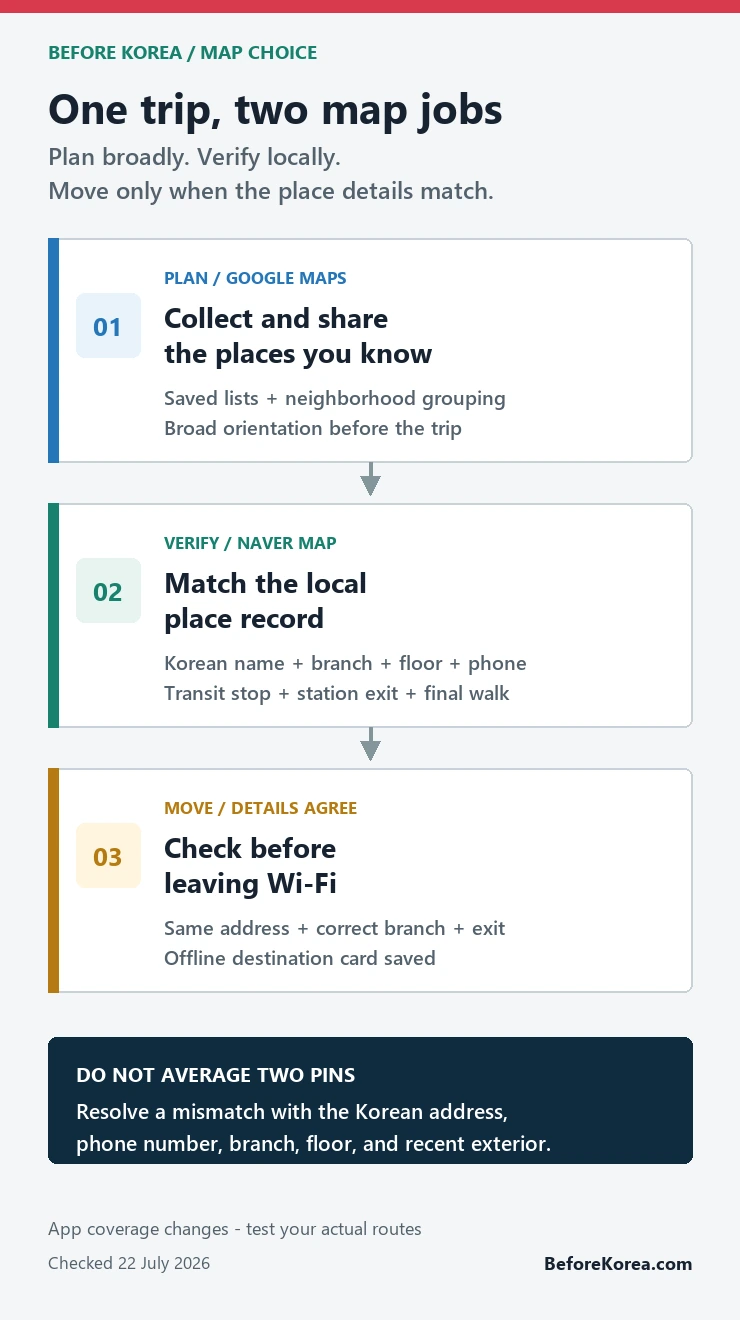
Use Google Maps in Korea to collect and share places you already know; use Naver Map to verify the Korean place name, branch, transit stop, exit, and final walk. Before moving, make sure both apps point to the same Korean address or phone number. If you want only one map for on-the-ground travel, install Naver Map first.
Checked 22 July 2026. Korea’s conditional approval of Google’s high-precision map-data export request is a policy milestone, not a promise that every Google Maps route is already complete on your phone. App versions and route coverage can change. Test the journeys that matter shortly before departure.
Which map should you use in Korea?
- Planning and shared lists: Google Maps is convenient when your saved places and travel companions are already there.
- Local place confirmation: Naver Map is the better first check for a Korean business name, branch, building, floor, and phone number.
- Transit and the final walk: check the station exit, bus stop, transfer, and last few minutes in Naver Map.
- When the apps disagree: do not average the two pins. Match the Korean address, official business page, phone number, recent storefront photos, and branch details.
The useful answer to “Google Maps vs Naver Map in Korea” is therefore not a permanent winner. Give each app a job, then verify the specific route you are about to take.
A two-map workflow that takes five minutes
- Build the trip list in the app your group already understands. For many visitors, that is Google Maps.
- Find the same hotel, restaurant, attraction, or clinic in Naver Map. Copy the Korean name from an official website, reservation message, or verified business page when English search is ambiguous.
- Confirm the district, street address, branch name, building, floor, and phone number. A matching English name alone is not enough.
- Open the route in Naver Map and note the station exit or bus stop that serves the correct side of the road.
- Before leaving Wi-Fi, save a small offline destination card with the Korean name, address, phone number, and exit.
This is most valuable for the places that are hardest to recover from: a late check-in, a timed reservation, a clinic appointment, a small restaurant, or a pickup point inside a large complex.
What the 2026 Google Maps news does and does not mean
South Korea conditionally approved Google’s request to export 1:5,000-scale map data in February 2026, subject to security and processing conditions. That creates a path for better Google mapping functions. It does not turn a government decision into an instant feature checklist for every traveler.
Keep policy news separate from the route on your screen. A feature can arrive gradually, differ between web and app versions, or still return a weak result for one local business. The practical test is simple: search your actual hotel, one small restaurant, and one transit journey. If the Korean place, exit, and final walk are clear, use the route. If not, switch to Naver Map rather than waiting for an app to prove a headline.
For background, read the February 2026 map-data decision report. Treat it as policy context, not as a substitute for checking the current app.
Where Google Maps earns its place
Google Maps is useful before the trip because many travelers already have years of saved places, shared lists, and familiar controls. Google’s own help page confirms that signed-in users can save places to lists and open them across devices. That makes it a practical collection layer for hotels, neighborhoods, attractions, and ideas sent by friends.
It is also useful for broad orientation. You can see how Seoul neighborhoods relate to one another, estimate whether two plans belong on the same day, and share a familiar pin. The problem begins when a broad pin is treated as proof of the correct branch, entrance, transit stop, or pedestrian approach.
Where Naver Map earns its place
Naver Map is built around Korea’s local place and transport ecosystem. Its official help page currently lists Korean, English, Simplified Chinese, and Japanese language settings. NAVER also says translated reviews and place filters are available in its multilingual service, while its 2026 visitor campaign highlights discovery, reservations, orders, payments, and local travel functions.
Those features do not make every listing perfect or every foreign account frictionless. They do make Naver Map the stronger place to confirm the local record behind an English travel idea. Use the official language-setting instructions, then search both the English and Korean names when the result is uncertain.
The final 500 meters: exits, branches, and floors
A station name gets you into the right underground complex; an exit number puts you on the right side of a wide road. At Hongik University Station, for example, Exit 6 is a physical street entrance, not an interchangeable label. Choosing another exit can leave you several crossings or a long block away from the route you expected.


The same precision matters above ground. Korean cities often have businesses with similar English names, multiple branches, basement units, upper-floor clinics, and entrances on a side street. Confirm the floor and phone number before trusting a pin. When recent storefront photos do not match the street, stop and recheck rather than walking farther.
Run three route tests before the trip
- Hotel to a major landmark: this checks whether basic transit and walking directions are usable.
- Hotel to a small restaurant: this exposes branch, Korean-name, alley, floor, and final-entrance problems.
- Late-night return: this checks reduced transit frequency, a sensible taxi pickup point, and whether the final walk still looks reasonable.
If Google Maps handles all three clearly on the current device, use it more confidently. Keep the destination saved in Naver Map anyway. If Google struggles with the small restaurant or exit, make Naver Map the primary route tool and leave Google as the shared planning list.
How to resolve a mismatched result
- Open the hotel’s, restaurant’s, clinic’s, or attraction’s official website or booking message.
- Copy the Korean name and road address instead of translating the English name yourself.
- Match the phone number and branch. These are often more reliable than a similar-looking translated name.
- Compare recent exterior photos with the building and floor information.
- For transit, compare the exit or stop with the destination side of the road. KakaoMap can serve as a third local check when the first two still disagree.
Save one offline destination card
A cropped route screenshot becomes stale and can hide the source or attribution. A small text card is more durable. Save the Korean place name, road address, branch, building and floor, phone number, nearest station and exit, and a link to the live listing. Add the hotel’s Korean address separately for taxis and help desks.
Do this before a long underground transfer or a late-night journey, when mobile data and battery are least convenient to troubleshoot. The card is a fallback, not a replacement for checking the live route.
Questions visitors ask before choosing a map
Can I use only Google Maps in Korea?
You can use it where the current result is clear, but do not decide from the app’s reputation alone. Test your real routes. Install Naver Map for Korean place matching, exits, local transit details, and a second route check.
Is Naver Map available in English?
Yes. NAVER’s current help page lists English along with Korean, Simplified Chinese, and Japanese. Some place names, menus, and reviews may still need Korean search terms or translation.
Which map should I show a taxi driver?
Show the Korean place name and road address from the business or hotel listing. Include the branch and phone number. The app matters less than giving the driver the correct local destination record.
Does the 2026 approval mean full Google navigation is finished?
No. Conditional approval allows a process subject to security and implementation requirements. Check the live app near your trip date and judge the route on the screen.
Sources and live services
- Google Maps and Google’s saved-place help: test the current route and manage planning lists.
- Naver Map and NAVER language help: test Korean place names, exits, transit, and language settings.
- NAVER multilingual-review announcement: background on translated reviews and place filters.
- NAVER’s 2026 visitor update and VISITKOREA’s 2026 campaign page: current visitor-facing feature context.
- February 2026 map-data decision report: policy background; it does not verify a route on your device.
Continue planning your Korea arrival
Set up the local app with the Naver Map Korea guide, then test the wider toolkit in Korea travel apps. Keep Korean names usable with Papago vs Google Translate, and protect the first journey with Incheon Airport to Seoul.