For most Korea trips, choose the plan by its functions first and its SIM format second. A data-only eSIM is enough for maps, translation, messaging, and ordinary browsing. Buy an eSIM or physical SIM that explicitly includes a Korean number, calls, and SMS when restaurants, taxi drivers, clinics, hotels, or reservation desks may need to reach you. The word eSIM alone does not tell you whether a phone number or text service is included.
If your phone is unlocked, supports eSIM, and you are comfortable installing a QR-code profile, eSIM is usually the easier format. A physical SIM is the safer choice when the phone has no eSIM support, you want airport-counter help, or you would rather let staff test the line before you leave. Neither format guarantees Korean app identity verification.
Official SK Telecom and LG U+ visitor-product guidance was checked July 23, 2026. Product features, activation rules, supported devices, and prices can change, so confirm the exact product page before paying.
An eSIM can be data-only or include calls and texts
An eSIM is a digital SIM profile installed on a compatible phone. A physical SIM is a removable chip. That is the format difference. The service attached to either format may be data-only, or it may include a Korean phone number and some combination of incoming calls, outgoing calls, and SMS.
This distinction matters because carrier product names are not interchangeable. The official SK Telecom visitor eSIM page, for example, labels one product eSIM (Data, Call, SMS). It says incoming calls and texts within Korea are free, while outgoing calls and texts require a recharge. LG U+ separately labels a Korea eSIM (Data Only) product and tells customers who need outgoing calls or texts to select its Data + Voice option.
| Your real need | Best starting point | Confirm before purchase |
|---|---|---|
| Maps, translation, messaging, and web access | Data-only eSIM | Unlocked phone, eSIM support, activation timing, hotspot rule |
| A Korean number for calls or reservation texts | eSIM or physical SIM marked Data/Call/SMS or Data + Voice | Incoming and outgoing call/SMS terms, passport-verification step, recharge rules |
| No eSIM support or uncertain compatibility | Physical prepaid SIM | SIM size, airport pickup hours, staff activation and test |
| Several people need shared data | Pocket Wi-Fi may be simpler | Battery, return location, deposit, and what happens when the group separates |
| Keep your home number active while using Korea data | eSIM on a dual-SIM phone | Which line handles data, calls, and texts; home-carrier roaming charges |
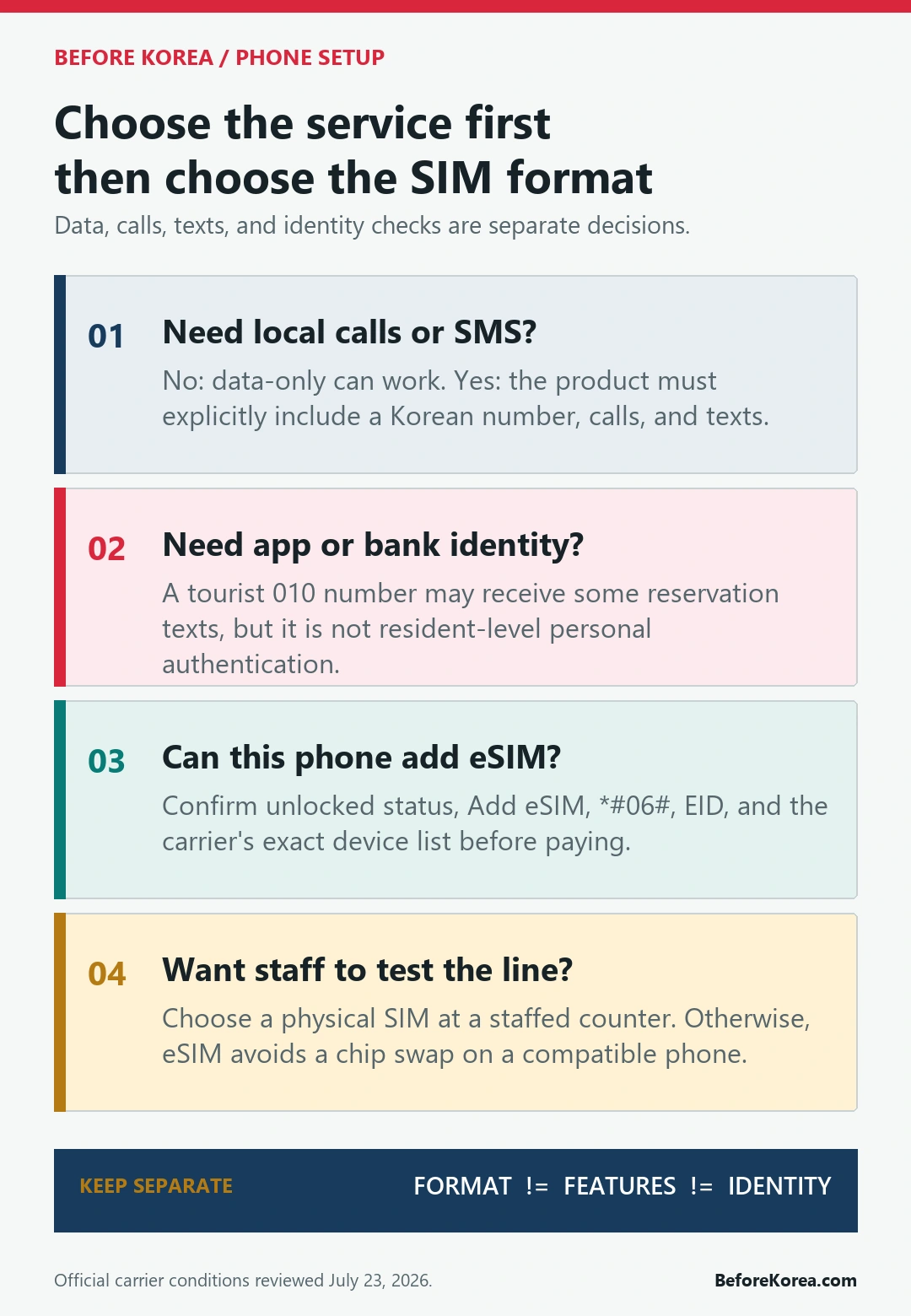
Do not compare two listings by the words “eSIM” and “SIM card” alone. Open the included-services section and look for data, Korean 010 number, incoming call, outgoing call, incoming SMS, outgoing SMS, and identity-verification limits. If one of those fields is missing, do not assume it is included.
Choose data-only when internet access is enough
A data-only eSIM works well for a short independent trip when your contacts can reach you through WhatsApp, KakaoTalk, iMessage, FaceTime, or another internet service. Naver Map, Papago, web search, train information, airline apps, and mobile boarding passes all use data. You can also message a hotel through its booking platform rather than by local SMS.
The limitation appears when a Korean service expects a normal phone call or text. A data-only line cannot receive a restaurant waitlist text, a rider’s call, or an SMS code. Buying more gigabytes does not solve that. If the trip depends on local reservations, write down how each service will contact you before choosing the cheaper plan.
Data-only can still be the better answer when you already have reliable roaming for calls and texts on your home line. On a dual-SIM phone, set the Korea eSIM as the mobile-data line and check the home carrier’s roaming charges before leaving the other line active. An accidental data-roaming session on the home line can cost more than the Korea plan.
Choose a Korean number when someone may need to reach you
A local number earns its keep when the trip includes restaurant queues, clinic or salon appointments, guided tours, luggage delivery, hotel callbacks, or taxi pickup problems. In those situations the useful feature is not simply “a number”; it is the ability to receive the type of call or text the business actually sends.
- Incoming calls: useful when a driver, hotel, clinic, or reservation desk needs to locate you.
- Incoming SMS: useful for waitlist notices and service-specific confirmation codes that accept tourist numbers.
- Outgoing calls or SMS: may require a separate voice balance or recharge even when incoming service is included.
- Passport verification: may be required before calls and texts work, even if mobile data is already active.
SK Telecom’s current visitor guidance says data can be used before passport information is verified, but calls and texts become available only after verification. That means a traveler can see a working data connection and still have a non-working phone number. Finish the carrier’s verification step and test both an incoming text and a call before relying on the line.
For a narrower comparison of products that advertise a local number, use our Korea eSIM with phone number guide. It focuses on the voice, SMS, and verification fields that are easy to miss on a checkout page.
A 010 number does not unlock every Korean service
A tourist plan can show a Korean 010 number and still fail a bank, government, payment, or resident-level mobile identity check. Number ownership, carrier passport verification, ordinary SMS delivery, and third-party identity authentication are different gates.
LG U+ makes the boundary unusually clear in its visitor eSIM FAQ: its Voice/SMS service can support SMS verification for restaurant and taxi reservation apps, but identity verification for banking or government services is not supported; its data-only service has no SMS verification. SK Telecom likewise states that personal authentication services and payment-related text receipt are unavailable on the visitor product shown in its official guidance.
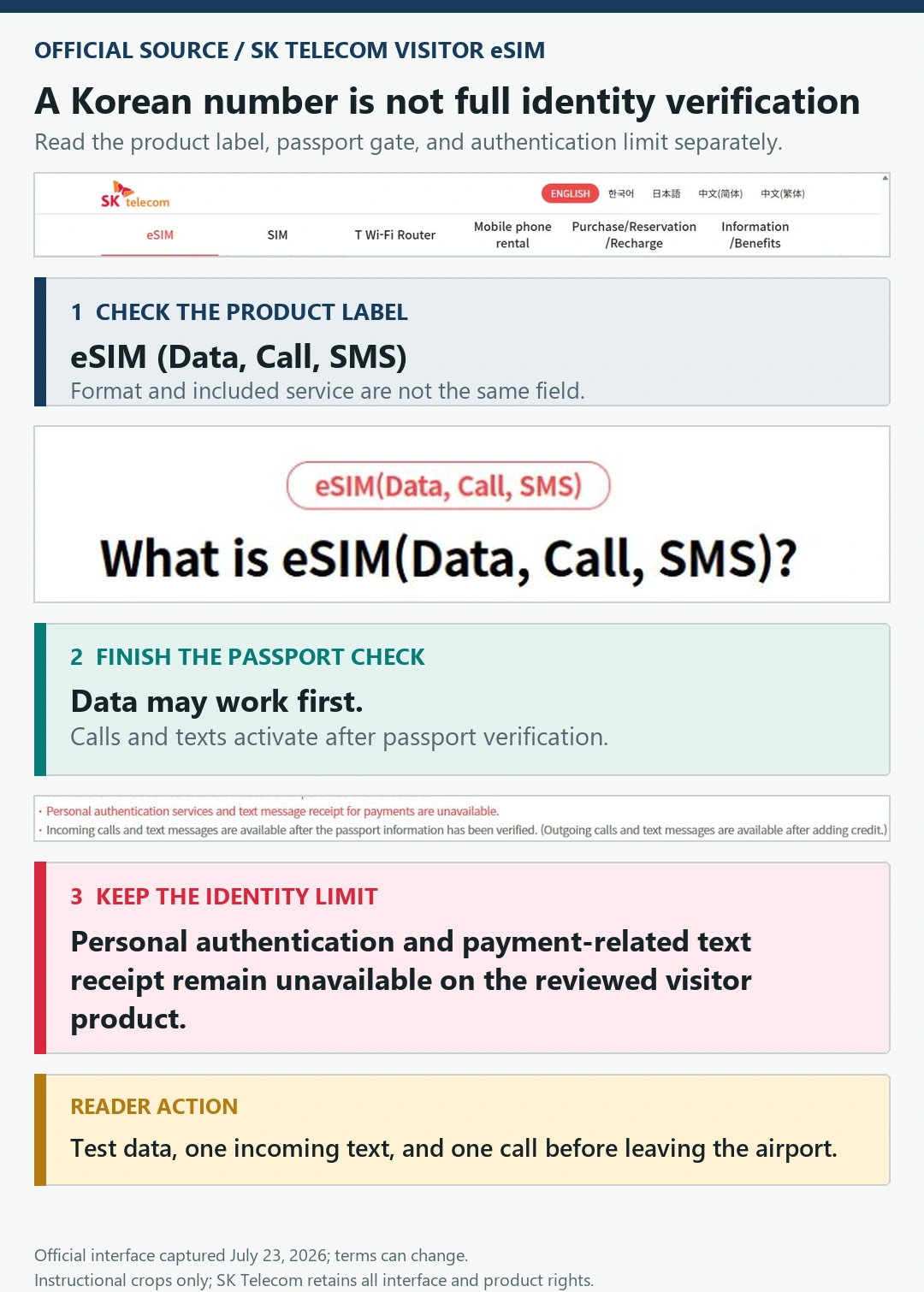
Treat app access as an app-specific question. A code arriving for one restaurant or taxi service does not prove that every Korean platform will accept the same number. Check our Korea phone number for apps and verification guide before buying a plan solely for one app. Keep a browser, hotel desk, or in-person booking route as a backup.
Check the phone before you pay
Start with the device, not the discount countdown. SK Telecom tells eSIM buyers to look for “Add eSIM” in the phone’s cellular or SIM-manager settings and to dial *#06# to check for an eSIM IMEI or EID. LG U+ also uses the EID check in its compatibility guidance. A phone can support eSIM in one market and lack support in another variant, so compare the exact model with the carrier’s current list.
- Confirm the phone is carrier-unlocked with the manufacturer or your current mobile provider.
- Open cellular or SIM settings and check that “Add eSIM” is available.
- Dial *#06# and confirm an EID or eSIM identifier appears.
- Check the exact phone model on the Korea carrier’s compatibility page.
- Read when the validity clock starts: purchase, QR installation, first data use, or another event.
- Save the QR code, order number, support contact, and pickup instructions offline.
Do not delete an installed eSIM profile while troubleshooting unless the carrier tells you to. Current LG U+ guidance says a downloaded profile cannot be restored once deleted, while SK Telecom warns that a locked phone cannot use the eSIM even if it can scan the QR code. If either point is uncertain, airport-counter activation is worth more than a small online saving.
Where eSIM and a physical SIM differ in practice
eSIM avoids a chip swap and can let a dual-SIM phone keep the home line available. It is convenient before a late arrival because there is no counter pickup. The trade-off is that installation depends on a compatible unlocked device, internet access for setup, a readable QR code, and careful line settings.
A physical SIM works on many phones without eSIM support and is easier to hand to airport staff when setup fails. Staff can check the chip, APN, network selection, passport registration, and a test call while you are still at the counter. The trade-off is pickup time, a physical card to store, and the risk of misplacing the home SIM.
Signal quality is not automatically better because a plan uses eSIM or a plastic card. Network, coverage, congestion, and the phone’s supported bands matter more. Compare the carrier and plan conditions, then choose the format that your phone and arrival schedule can support. Our Korea SIM card for foreigners guide covers the broader purchase and pickup choices.
Test the line before leaving the airport
Do not stop when the phone shows signal bars. A useful arrival test checks the exact functions you paid for. Connect to airport Wi-Fi while installing an eSIM, finish any passport-verification step, and keep the provider voucher open until every required function works.
- Confirm the Korea line is enabled and selected for mobile data.
- Turn off mobile data on the home line if you do not intend to roam.
- Open a fresh web page, Naver Map, and a translation app with Wi-Fi turned off.
- If the plan includes a number, find it in settings and save it with the +82 format.
- Receive a test text and call; test an outgoing call only if the plan includes credit.
- Take a screenshot of the active line settings and keep the support contact offline.
If data works but calls or texts do not, check passport verification and voice balance before changing network settings. If nothing works, ask the counter or official support team to confirm activation, APN, network selection, and device compatibility. Deleting the profile is not a harmless reset.
What the SIM choice will not fix
A working Korea line does not make a foreign payment card domestic, translate an app, create a resident identity, or guarantee that a delivery platform accepts a hotel address. Phone setup removes one layer of friction; payment, identity, language, and address rules remain separate.
Set up the apps you need before departure with our Korea travel apps guide. For rides, compare the contact and payment paths in Kakao T versus Uber in Korea. If checkout fails after the phone is working, use the foreign card troubleshooting guide instead of buying another SIM.
Groups that mainly need shared internet should also compare a router. A pocket Wi-Fi device avoids installing a profile on every phone, but everyone loses data when the battery dies or the person carrying it walks away. The Korea Wi-Fi rental versus eSIM and SIM guide covers that separate decision.
Korea eSIM and SIM questions
Can a Korea eSIM include a Korean phone number?
Yes. Some official carrier visitor eSIMs include data, calls, SMS, and a Korean number. Others are data-only. Read the exact product label and the incoming, outgoing, verification, and recharge terms before paying.
Does a physical tourist SIM always include calls and texts?
No. A plastic SIM describes the delivery format, not the included service. A physical card can also be data-only. Confirm the same feature list you would check for an eSIM.
Will a tourist 010 number verify every Korean app?
No. Some reservation texts may work, but carrier visitor pages explicitly limit personal authentication and payment-related verification. Test the exact app and keep a non-app backup rather than assuming the number unlocks all services.
Should I install the eSIM before flying?
Purchase early enough to solve compatibility problems, but follow the provider’s activation instructions. Some validity periods begin at installation or QR scan, while others begin with first use. Save the voucher offline and avoid starting the plan earlier than intended.
Sources and review date
This page was reviewed July 23, 2026 against the official SK Telecom eSIM (Data, Call, SMS) product and verification guidance and the official LG U+ Korea eSIM product and FAQ. Carrier pages control current eligibility, device support, activation, refunds, call and SMS terms, and pricing. Before Korea explains the decision but does not sell, activate, or guarantee a telecom service.