A Korea eSIM can include a local 010 phone number, but the number alone does not tell you what the plan can do. Before buying, check five things separately: whether a number is assigned, whether it can receive calls and texts, whether it can make calls and send texts, whether the service supports the SMS code needed by the app you care about, and whether it supports Korean carrier-based identity verification. The last two are not the same.
This guide was checked on July 23, 2026. Carrier products, activation rules, prices, and app policies can change. Use the current product page for the exact plan you are buying, and treat the carrier examples below as examples rather than rules for every tourist eSIM.
Decide what the number must do
Start with the real task, not the phrase “Korean phone number.” A hotel may only need a number where staff can reach you. A taxi driver may need to call about a pickup point. A restaurant waitlist may send a text. Another app may send a sign-up code. A bank or government service may ask for carrier-based real-name verification. Those are different requirements.
- Contact only: you need to receive a local call or ordinary text.
- Two-way contact: you also need to call back or send a text.
- App code: one named app must accept and deliver a verification message to the plan.
- Real-name verification: the service asks the mobile carrier to confirm a Korean subscriber identity.
If maps, translation, messaging, and web bookings cover the whole trip, a number may add cost and setup without solving a real problem. If local callbacks are part of the itinerary, a number plan can be useful, but only after its call and SMS conditions are clear.
Read the plan as five separate permissions
Product labels such as “data,” “voice,” “SMS,” and “phone number included” are not consistent enough to compare by headline alone. Open the detailed product page and work through these checks in order.
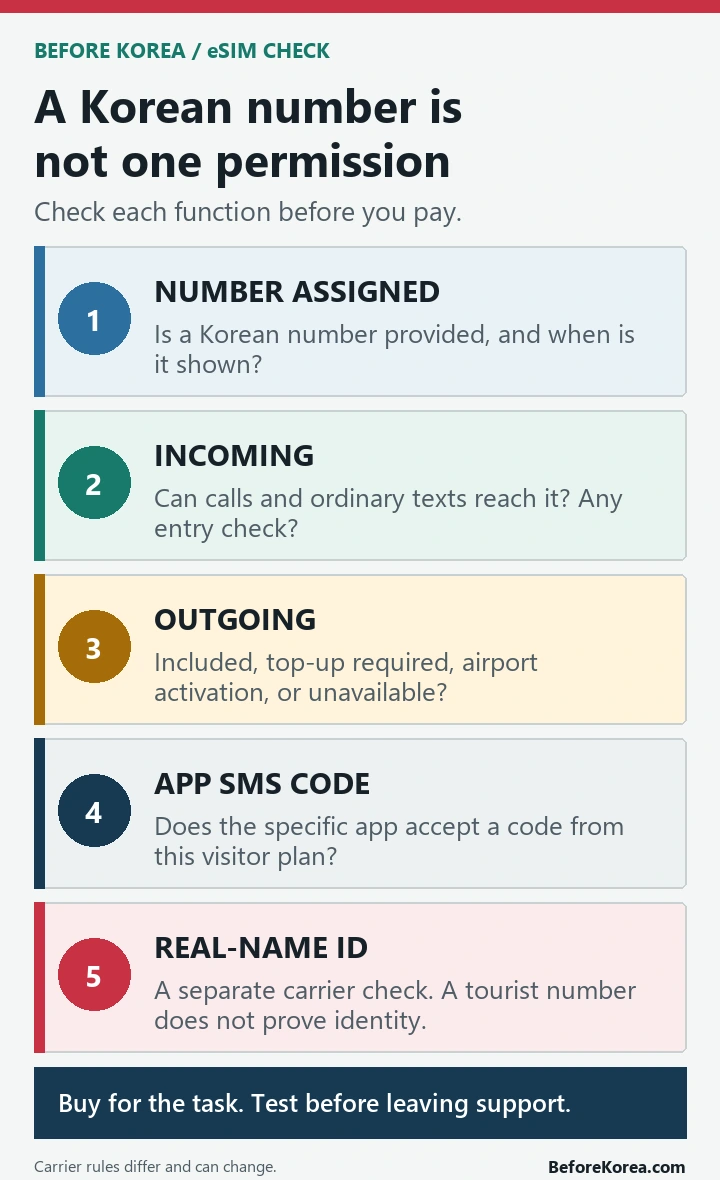
- Number assigned: confirm that the plan provides a Korean mobile number and when it becomes visible.
- Incoming service: check whether ordinary domestic calls and texts can reach that number and whether passport or entry confirmation is required first.
- Outgoing service: check whether calls and texts are included, require a separate balance, or are unavailable.
- App SMS codes: look for an explicit statement about verification messages, then confirm the policy of the specific app.
- Carrier identity verification: do not assume that a prepaid visitor number can authenticate you for banking, government, payments, age checks, or resident-only services.
A plan can pass the first three checks and still fail the fourth or fifth. That is why “includes a 010 number” is useful information, but not a complete buying answer.
Current carrier examples show why the details matter
On its current Korea eSIM product page, LG U+ separates Data Only from Data + Voice. Its comparison says both have data and incoming calls or texts, while outgoing calls and texts are limited to Data + Voice. The same page says app SMS verification is available when using voice and SMS services, but not on its data-only service, and that banking or government identity verification is not supported.
KT uses a different process. Its current visitor eSIM page says its products provide 010 numbers, but voice and SMS become available only after an entry check. The page also says outgoing voice and SMS products are bought at an airport KT Roaming Center and that KT’s visitor eSIM does not support personal authentication.
SK Telecom gives another variation. Its current Data, Call, SMS eSIM page says incoming calls and texts become available after passport information is verified, while outgoing calls and texts require a top-up. It describes the product as a short-term service for foreign visitors.
These are carrier-specific examples checked on the date above. They are not a promise that every reseller using one of those networks has the same package, activation path, or app-verification support. If a reseller page is vague, ask for the exact carrier product and written answers before paying.
An SMS code is not Korean identity verification
A normal SMS code proves that a message reached a number. Korean mobile identity verification asks a carrier-linked system to match subscriber details, usually including a name and other identity information. A tourist can therefore receive ordinary messages and still be unable to pass a real-name screen.
App behavior is also its own layer. A carrier may say that its voice and SMS product can receive verification messages for some restaurant or taxi apps, but the app can change its accepted number types, country settings, account rules, or foreign-user flow. Do not buy a plan solely because a blog says “Korean number works.” Check the named app and keep another way to complete the task.
If a service displays a Korean real-name verification screen, retrying the same tourist number usually will not change the type of account behind it. Look for a foreign-user option, use an international service that supports your existing account, or choose an offline route instead of assuming the eSIM is defective.
Check the phone before paying
The phone must support eSIM and be unlocked for another carrier. Many providers ask you to dial *#06# and look for an EID, but an EID by itself does not guarantee that a particular foreign model will work on a particular Korean plan. Check the carrier’s current compatibility instructions and ask your home carrier whether the device has a SIM or country lock.
- Confirm the exact phone model and where it was purchased.
- Confirm that the device is unlocked and supports eSIM.
- Read the provider’s current compatibility and refund conditions.
- Check whether installation needs internet and whether the QR code can be issued again.
- Do not delete an installed profile until the provider confirms that reinstallation is possible.
Device exclusions and activation windows change, so this guide does not reproduce a model list. The LG U+ eSIM FAQ, KT page, and SK Telecom page above provide current carrier instructions.
Activate and test while support is nearby
Install according to the provider’s timing rule, then test the functions you actually bought before leaving the airport counter or another place with reliable Wi-Fi and support access. A data connection alone is not a complete test for a number plan.
- Open a webpage with Wi-Fi turned off to confirm mobile data.
- Find and save the Korean number shown by the device or provider.
- Receive an ordinary text and call if the plan includes them.
- Make a short outgoing call or send a text if that service is included or topped up.
- Test the one app that matters to the trip, without assuming the result applies to every app.
If one test fails, capture the product name, order number, phone model, number shown in settings, and exact error message. That gives carrier support something concrete to diagnose.
Use two SIMs without creating a roaming surprise
A dual-SIM phone can keep the home number available while using the Korean eSIM for data, but the settings and charges depend on the phone and home carrier. Label both lines, choose the Korean eSIM as the mobile-data line, and review data roaming and automatic data switching before travel. Do not copy a switch-by-switch setup from another phone model without checking your own menus.
Keeping the home line active may help with messages from services tied to that number, but it can also create roaming charges for calls, texts, voicemail, or data. Confirm the home carrier’s policy first. If the Korean plan includes a local number, save it in your contacts with the plan end date so you do not keep giving it out after it expires.
Know when data-only is enough
Choose data-only when the trip mainly needs maps, translation, web booking, email, and internet messaging, and when hotels or tour operators already communicate through an app. It is often the simpler choice for a short, planned itinerary.
Pay for a number plan when a reachable local contact is part of the trip: a clinic appointment, restaurant waitlist, local tour callback, delivery handoff, or taxi pickup where a driver may call. Then match the plan to that task. Receiving a call may be enough; sending texts or passing an app code may require a different product.
The Korea eSIM vs SIM card guide compares the physical setup decision. This article is narrower: it explains what the number attached to either type can and cannot prove.
Keep a backup for calls and reservations
Do not make one untested number the only route to an important booking. Save the venue’s Korean name, address, and message thread. Ask a hotel desk to call only with permission and explain that the callback may reach the hotel rather than you. For a restaurant, keep a walk-in alternative. For a taxi, choose a visible pickup point and use the in-app message field when available.
For the wider setup, use the Korea travel apps checklist. The Kakao T and Uber guide covers ride backups, and the food-ordering guide explains practical alternatives when an account or payment flow does not work.
Questions travelers still ask
Does every Korea eSIM include a phone number?
No. Some products are data-only, some assign a number with limited incoming service, and others include or sell outgoing voice and SMS. Read the exact product details rather than the network name alone.
Will a tourist eSIM number work for every Korean app?
No. Carrier support for SMS, the app’s accepted number types, and Korean real-name requirements are separate checks. Test the specific app and keep a fallback.
Can a 010 number verify me for banking or government services?
Do not assume so. The current visitor pages checked for this guide distinguish ordinary communication or app SMS codes from carrier-based personal authentication, and explicitly limit the latter.
Should I buy the eSIM before landing?
Buying in advance can save time, but activation, voice service, passport checks, and refund rules differ. If outgoing calls or in-person verification matter, confirm whether the chosen plan requires an airport counter visit.
Official carrier pages and related Before Korea guides
Check the exact current plan on LG U+, KT Roaming, or SK Telecom. Compare number assignment, incoming and outgoing service, app SMS support, identity-verification limits, compatibility, activation, and refunds before purchase. Then use the Before Korea guides linked above for the surrounding travel workflow.