A Korea translation app is useful, but it can also create false confidence. Translation works best when you use short, direct sentences and understand which situation needs precision: allergies, medicine, taxi destination, clinic symptoms, product labels, or payment trouble.
Test Papago in the mode you will actually use
Use Official NAVER Papago translation service for the current Papago app and language support. Test the same text, voice, or camera mode needed during the trip instead of assuming every feature works offline.
- Official NAVER Papago translation service
- Seoul guide to the Emergency Ready App
- VISITKOREA
- VISITKOREA official travel site
- NAVER Papago on Google Play
- NAVER Papago on the App Store
Keep critical names, numbers, and Korean text unchanged
Choose the language pair, download any supported offline language, save critical phrases, and keep original Korean text for names, addresses, allergies, or medicine.
- Language pair
- Text, voice, or camera mode
- Downloaded offline language
- Saved critical phrase
Use Papago and Google Translate as a two-app backup. Keep phrases short, confirm critical details, and do not rely on machine translation alone for allergies, medicine, contracts, or emergencies.
If you have a nut allergy, do not only point the camera at a menu. Prepare a Korean allergy sentence, show it to staff, and choose simpler dishes when the kitchen cannot confirm ingredients. Translation helps, but it is not a guarantee.
Compare text, voice, camera, and offline behavior
- Test short typed sentences and proper names before relying on a long automatic translation.
- Try voice and camera translation in lighting and noise similar to the expected situation.
- Check which functions still work in airplane mode and which require data or an account.
- Keep dates, quantities, addresses, ingredients, and medical terms in their original form beside the translation.
- Ask a person to confirm any translation that could affect health, safety, money, a legal document, or a missed journey.
Routine translation and high-stakes interpretation are different jobs
Papago is useful for routine context when the input is clear and the traveler can compare the original. It should not be the only evidence for a serious allergy, medicine instruction, contract, or emergency message.
| App check | What it changes |
|---|---|
| Restaurant menu | Use camera translation plus staff confirmation: Ingredients and spice can be missed. |
| Taxi destination | Show Korean address: Address text is safer than a translated sentence. |
| Clinic or pharmacy | Prepare symptoms and medicine names: Precision matters. |
| Shopping label | Translate but verify dates and warnings: Product labels can have small but important details. |
For Korea translation app guide for menus, taxis, clinics, shopping, and emergencies, machine translation can lose context, names, quantities, or urgency; obtain human confirmation when the answer affects health, safety, money, or legal rights.
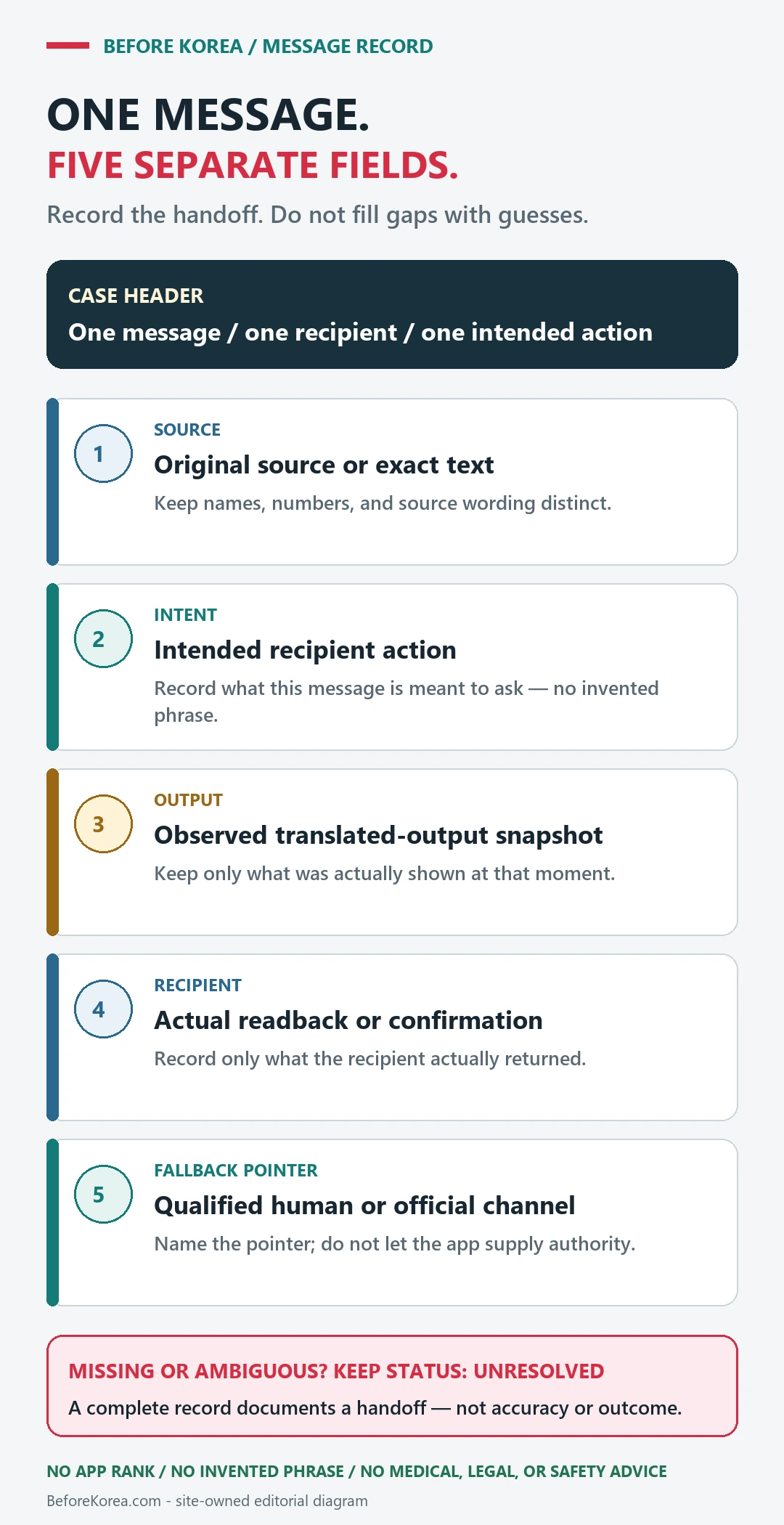
If the translation changes the meaning
Shorten the sentence, remove slang, keep names and numbers unchanged, and compare text, voice, or camera results instead of repeating the same input.
Use hotel staff, an official help desk, a clinic interpreter, or another human channel when a wrong answer would have a serious consequence.
Related guides
Keep dates, names and entry rules exact
Use translation to understand a concert or pop-up notice, but copy the event name, account name, date, KST time, seller, venue and ID wording exactly into a separate note. Those fields are identifiers and deadlines, not prose to rewrite freely.
| Notice field | Preserve exactly | Use translation for |
|---|---|---|
| Event and venue | Official title, Korean venue name and road address | Understanding directions and context |
| Sale or reservation time | Date, clock time and KST label | Understanding the sale stage |
| Identity and entry | Accepted ID, name-match wording and original-document requirement | Preparing questions for official support |
| QR and app | App name, login state and screenshot rule | Following the screen sequence |
The official SEVENTEEN V8 pop-up notice on Weverse is an example of a notice that gives event-specific reservation, QR and entry conditions. Open NAVER Papago in a second tab, but return to the original notice before acting.
A machine translation cannot confirm eligibility, resolve ambiguous ID wording or replace the host’s answer. If one translated word changes whether you can enter or receive a refund, ask the official seller or host.
Last checked: August 7, 2026. Event notices can be revised after the first translation.
Use one app for routine context and one human route for consequences
NAVER Papago’s current web surface presents text, image, document, voice and website modes, but availability, accounts, connectivity and results can change. Test the exact installed app, language pair and mode with airplane mode on and off before travel. Do not promise that a feature, language download or camera result will work on a specific phone.
| Situation | App can help | Escalate when |
|---|---|---|
| Menu or sign | Capture context and preserve the original Korean | An allergy, ingredient or legal restriction matters |
| Taxi or delivery address | Show the exact Korean address and landmark | The driver or courier cannot confirm the destination |
| Clinic or pharmacy | Organize symptoms, medicine names, doses and time | Treatment, allergy, pregnancy, interaction or emergency decisions depend on it |
| Immigration or official form | Understand interface labels | An answer changes eligibility, legal status or declaration |
Protect names, numbers and private documents
Keep passports, residence cards, prescriptions and full medical records out of camera or document translation unless the exact service and privacy consequence are understood. Translate only the minimum text needed. Preserve names, dates, dosages, prices, addresses and reference numbers in the original script beside any translation.
For tourism information and interpretation, verify the current 1330 Travel Helpline. For immigration questions, use the official 1345 center. For an immediate emergency, contact the emergency service rather than waiting for an app translation. A machine output is not a medical, legal, customs or immigration decision.
Current source review, August 24, 2026: Papago’s current modes, the official 1330 tourism channel and the 1345 immigration channel were rechecked. App interfaces and language support can change, so live device testing remains part of the recommendation.