For travel in Korea, install one Korean-capable translation app and one independent backup before departure. Papago and Google Translate both currently offer text, image, voice, conversation, and offline functions, but availability can differ by language pair, device, operating system, and app version. Test the exact mode you will use. Keep Korean names, addresses, numbers, and official wording unchanged, and never let one machine translation make a high-stakes decision for you.
The useful question is not “Which app is always best?” It is “What am I trying to communicate, what evidence can I preserve, and what happens if the translation is wrong?” A menu, a hotel address, a taxi destination, and an allergy statement need different handling.
Official app listings and Google Translate help pages were checked on July 22, 2026. App names, supported languages, downloads, permissions, screens, and offline packages can change. Recheck the official store page on the phone you will carry.
Install two verified apps before the trip
Download from an official app store and confirm both the app name and developer. The current Android listing identifies Naver Papago – AI Translator as published by NAVER Corp. and Google Translate as published by Google LLC. Do not install a similarly named translator from a search ad or third-party download site.
Papago’s official listing currently names 14 supported languages: Korean, English, Japanese, Simplified and Traditional Chinese, Spanish, French, Vietnamese, Thai, Indonesian, Russian, German, Italian, and Arabic. It lists text, image, voice, offline, conversation, handwriting, website, document, in-app mini translation, and dictionary functions. If your source language is outside that list, Papago is not a complete first choice for that trip.
Google Translate’s official listing includes Korean in a much broader language list and describes typed text, camera, imported photos, conversation, handwriting, phrasebook, and offline functions. Google’s help center also says languages can be downloaded for offline use and recommends doing so on Wi-Fi. Neither feature list proves that one app will translate your exact Korean sentence better. Use the Papago vs Google Translate comparison when you want to test the same phrases in both tools.
Use these first-party pages rather than an app roundup to confirm the current product: the official Papago Google Play listing, Papago web service, official Google Translate Google Play listing, Google’s camera, conversation, offline, and phrasebook tips, and the Android setup guide.
Before choosing the primary app, run the same three travel tests in both: paste the Korean hotel address without translating it, photograph one real Korean menu or label, and type one short request in your own language. Check whether the app preserves names and numbers, whether the camera attaches text to the correct row, and whether the translated request can be simplified further. Keep the app that handles your actual source language and phone reliably; keep the other installed for disagreement and service failure.
| Decision | Papago | Google Translate | Before Korea rule |
|---|---|---|---|
| Correct app | Naver Papago – AI Translator / NAVER Corp. | Google Translate / Google LLC | Match both name and developer |
| Language coverage | Use only a pair listed in the current app description | Check that your pair and needed mode are supported | Do not assume every mode supports every pair |
| Offline use | Download available offline data inside the app | Download available languages inside the app | Test in airplane mode before travel |
| Best-app claim | No official feature page proves a universal winner for Korean travel | Test the same real task in both | |
Choose the mode from the task
Start with the source that preserves the most information. Copied Korean text is usually better than retyping a name from memory. A still photo is easier to inspect than a moving camera overlay. A short written request is easier to verify than a long live conversation in a noisy room.
| Travel task | First mode | Keep visible | Failure check |
|---|---|---|---|
| Hotel, station, or restaurant address | Copy the original Korean text | Branch name, road address, phone number | Confirm the map pin; do not translate the address |
| Menu or sign | Still-photo image translation | Original line, price, portion, and symbols | Crop one area and compare the result |
| Short request to staff | Typed text | Your source sentence and translated sentence | One request at a time |
| Calm one-to-one exchange | Conversation or voice mode | Recognized source text before playback | Pause after each answer and confirm numbers |
| No data connection | Downloaded offline mode | Saved address and critical phrases | Verify that the exact pair works in airplane mode |
| Allergy, medicine, emergency, legal, or large payment | Human or official assistance | Original document, label, diagnosis, amount, or rule | Do not use app-only confirmation |
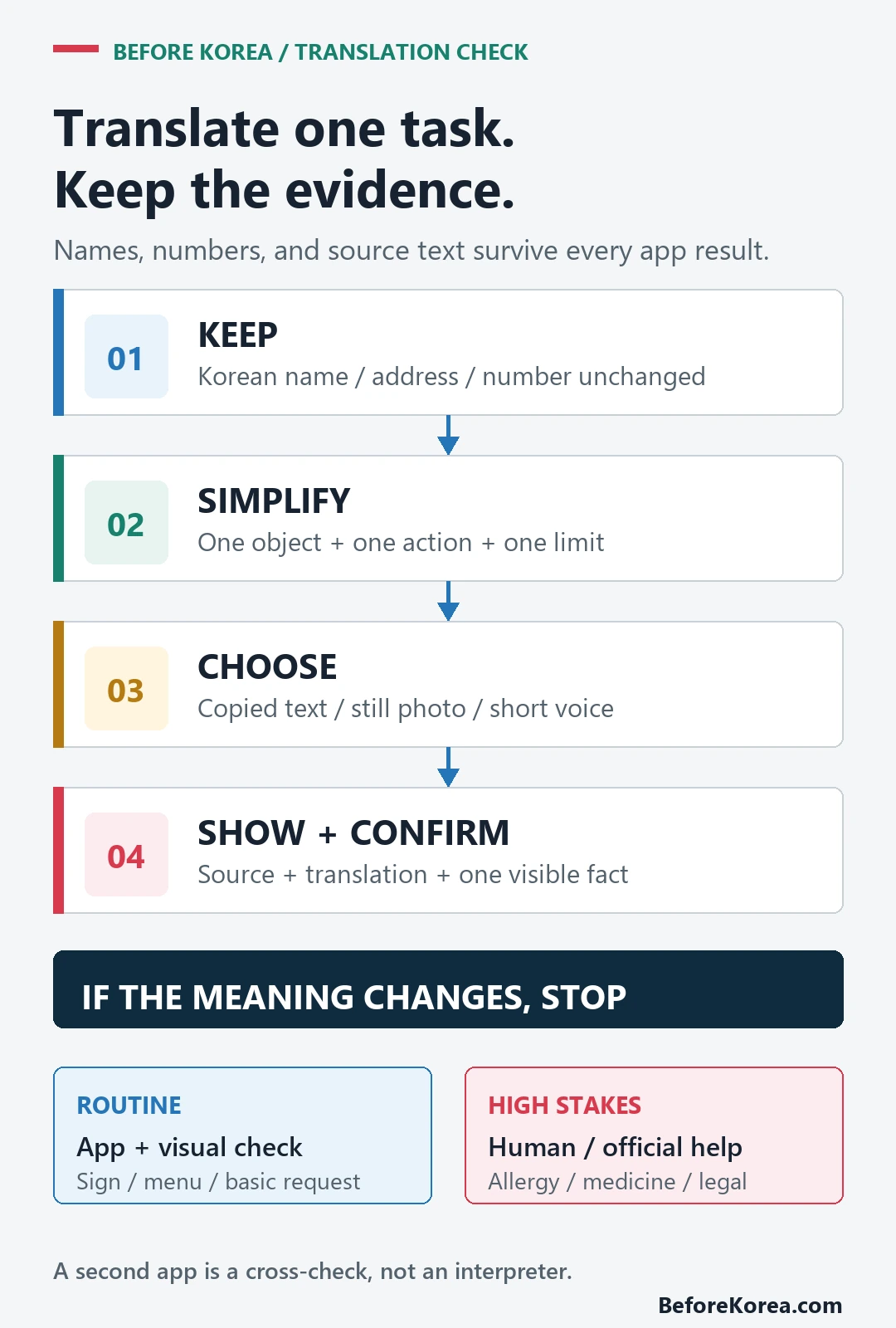
The app is a bridge between people, not the authority behind the fact. A translation can help you ask where a platform is; the rail operator’s sign or timetable still decides the route. It can help you identify a menu line; the package label and staff confirmation still decide whether an ingredient is present.
Keep names, addresses, and numbers unchanged
Proper names are where helpful translation often becomes harmful. Do not translate a Korean road address into an English description for a taxi driver. Show the original Korean address, business name, branch, phone number, and map pin together. Two restaurants with the same brand can be in different neighborhoods.
Protect numbers from the sentence. Put the date, time, amount, quantity, room number, terminal, exit number, or platform on its own line. Ask the other person to point to or repeat the number. A fluent-looking paragraph can still reverse a time, drop a zero, or attach a quantity to the wrong item.
For navigation, paste Korean place text into the map rather than translating it first. The Naver Map guide for Korea explains why branch identity and the final pin matter more than an elegant English place name.
Make one sentence easy to translate
Write for a machine and a busy human at the same time. Remove jokes, idioms, indirect hints, double negatives, and several requests joined by “and.” State the object, action, and limit. Keep the source sentence on screen so the other person can see what you intended even if the Korean output is awkward.
| Harder input | Safer structure | Why it helps |
|---|---|---|
| Could you maybe take me somewhere near this place? | Please go to this exact address. [show Korean address] | Removes an undefined destination |
| I cannot really eat that kind of thing | I must not eat [specific ingredient]. Is it in this dish? | Names the restriction and asks one question |
| We need two for later, not now | Quantity: 2. Pickup time: 18:00. | Separates quantity from time |
| Is this the one that goes there? | Does this train go to [Korean station name]? | Preserves the destination identity |
Do not save a machine-translated allergy or medical phrase once and treat it as permanent. The source wording may be too broad, too narrow, or medically unclear. Prepare the original facts first, then have a qualified person or the relevant service confirm the communication when the consequence is serious.
Test offline use before leaving Wi-Fi
- Install the official apps and open each one at least once.
- Download the source and Korean language data that the current app offers.
- Turn on airplane mode and disable Wi-Fi.
- Test one typed phrase, one saved phrase, and the exact camera or voice function you expect to use.
- Save the hotel address and other critical Korean text outside the translation app.
An “offline” label does not mean every feature behaves the same without data. A language pack may cover text while camera, voice, dictionary detail, or a newer feature still needs a connection. Google’s setup help explicitly says the app displays “Not available offline” when a selected language cannot be downloaded. Let the phone prove what works before the airport proves what does not.
Use camera translation without trusting the overlay
Camera translation is useful for orientation, but moving overlays can attach a word to the wrong menu row or hide the original price. Take a straight, well-lit photo. Crop one heading or item. Compare the translated line with the original position, number, and any allergen or warning symbol.
On packaging, translate the ingredient panel rather than only the marketing text on the front. Look for separate sections such as ingredients, allergen notice, storage, expiration, and preparation. If the print is curved, reflective, stylized, or very small, use several photos and do not force a confident answer from a bad image.
For restaurant use, the food-ordering guide covers portion and ordering behavior, while the Korean food allergy guide explains why broth, sauce, garnish, and shared preparation require more than a camera result.
Let the other person read and confirm
Do not read an unfamiliar machine translation aloud as if you know its tone. Show the screen with large text, keep the original sentence available, and give the person time to read. For a short answer, ask for a point, number, map pin, or written response that survives another translation pass.
Voice mode works best when one person speaks at a time in a quiet place. Check the recognized source text before the app plays the translation. If the app heard the wrong station, ingredient, or amount, the translated output cannot repair it. Move to typed text when background noise or pronunciation keeps changing the source.
Escalate allergies, medicine, emergencies, and legal decisions
A second app is a cross-check, not a professional interpreter. If two apps disagree on a casual menu description, choose a different item or ask staff. If they disagree on an allergy, medicine dose, medical symptom, emergency instruction, immigration rule, police statement, contract, tax, or large payment, stop the transaction and get qualified or official help.
| Risk level | Examples | Translation app role | Required backup |
|---|---|---|---|
| Low | Greeting, restroom, basic sign | First answer is usually enough to continue | Visual context |
| Moderate | Taxi branch, ticket time, menu order, price | Translate and cross-check names or numbers | Map, original text, receipt, or staff confirmation |
| High | Severe allergy, medicine, emergency, legal or immigration statement | Only helps establish initial contact | Qualified human or official service |
Keep private information out of photos when it is not needed. A passport, prescription, medical result, payment card, booking code, or personal message can reveal more than the one line you need translated. Crop or cover unrelated details before using an image function, and review the current app privacy information if the material is sensitive.
Build a five-minute travel translation kit
- Official Papago or another Korean-capable primary app, plus Google Translate or another independent backup.
- Downloaded language data tested with airplane mode on.
- Hotel name, Korean road address, map pin, phone number, and booking reference saved outside the apps.
- One short source-language note for each dietary, mobility, or communication need.
- Critical numbers on separate lines and a plan for human help.
The menus, taxis, and clinics translation guide applies this kit to specific pressure moments. The broader Korea travel apps guide covers maps, transport, and booking tools, while the KakaoTalk travel-readiness guide covers account and contact continuity that translation alone cannot replace.
Questions travelers ask
Is Papago better than Google Translate for Korean?
No official feature list proves a universal winner. Papago has a smaller published language set centered on Korean and regional travel pairs; Google Translate has broader published coverage. Test your own address, menu, request, and offline pair in both rather than repeating a general claim.
Can I use a translation app without internet in Korea?
Both official listings describe offline functions, but support varies. Download the needed data and test the exact text, camera, or voice task in airplane mode before departure.
Should I translate a Korean address into English?
No. Preserve the Korean road address, place name, branch, phone number, and map pin. Translate only the request around that evidence.
Can an app confirm a food allergy or medicine instruction?
It can help start the conversation, but it should not be the only confirmation. Preserve the exact ingredient or medicine information and use qualified human or official assistance when a mistake could cause harm.
Sources checked July 22, 2026: the official Google Play listings for Naver Papago – AI Translator and Google Translate, the official Papago web service, and Google Translate Help pages for setup, offline use, camera, conversation, and saved phrases. Each source is linked where it supports a task.