WOWPASS is useful when a visitor wants one physical card for local prepaid purchases and public transport, plus an app for balance checks and card control. It is not one universal pot of money. The WOWPASS payment balance and the card’s Tmoney transportation balance are separate, so each must be funded and managed for its own job.
The card can reduce dependence on a foreign card at Korean shops, but it should not become your only way to pay. Keep a second card and a modest amount of cash somewhere else. That backup matters if the app, phone, kiosk, identity check, merchant terminal, or one balance does not work when you need it.
Checked July 22, 2026 against the official WOWPASS service, usage guide, Google Play listing, and VISITKOREA transportation-card guide. Prices, top-up routes, fees, machine locations, app screens, and refund rules can change; confirm them in the current app or official site before loading a large amount.
Decide whether WOWPASS solves your payment problem
WOWPASS makes the most sense when you want a prepaid spending limit, expect some Korean merchants to reject an international card, or value seeing local purchase alerts in one app. It is less compelling when your own cards work reliably, you need many online or in-app purchases, and an ordinary Tmoney card already covers your transport.
| Your situation | What WOWPASS can solve | What it does not remove |
|---|---|---|
| You prefer a fixed travel spending pot | Load a limited prepaid balance and review local transactions | You still need to compare the top-up cost and exchange route |
| Your foreign card sometimes fails in Korea | Use the WOWPASS balance at supported offline local-card merchants | It does not guarantee every website, app, deposit, or unattended terminal |
| You need subway and bus access | Use the integrated Tmoney function | The Tmoney balance must be loaded separately |
| You want one card to replace every backup | That is the wrong use case | Keep a second card and cash outside the same wallet |
If you are still choosing a product, use the T-money vs WOWPASS vs Climate Card comparison. This page assumes you chose WOWPASS and need to operate it without mixing up its balances.
Understand the two balances before loading money
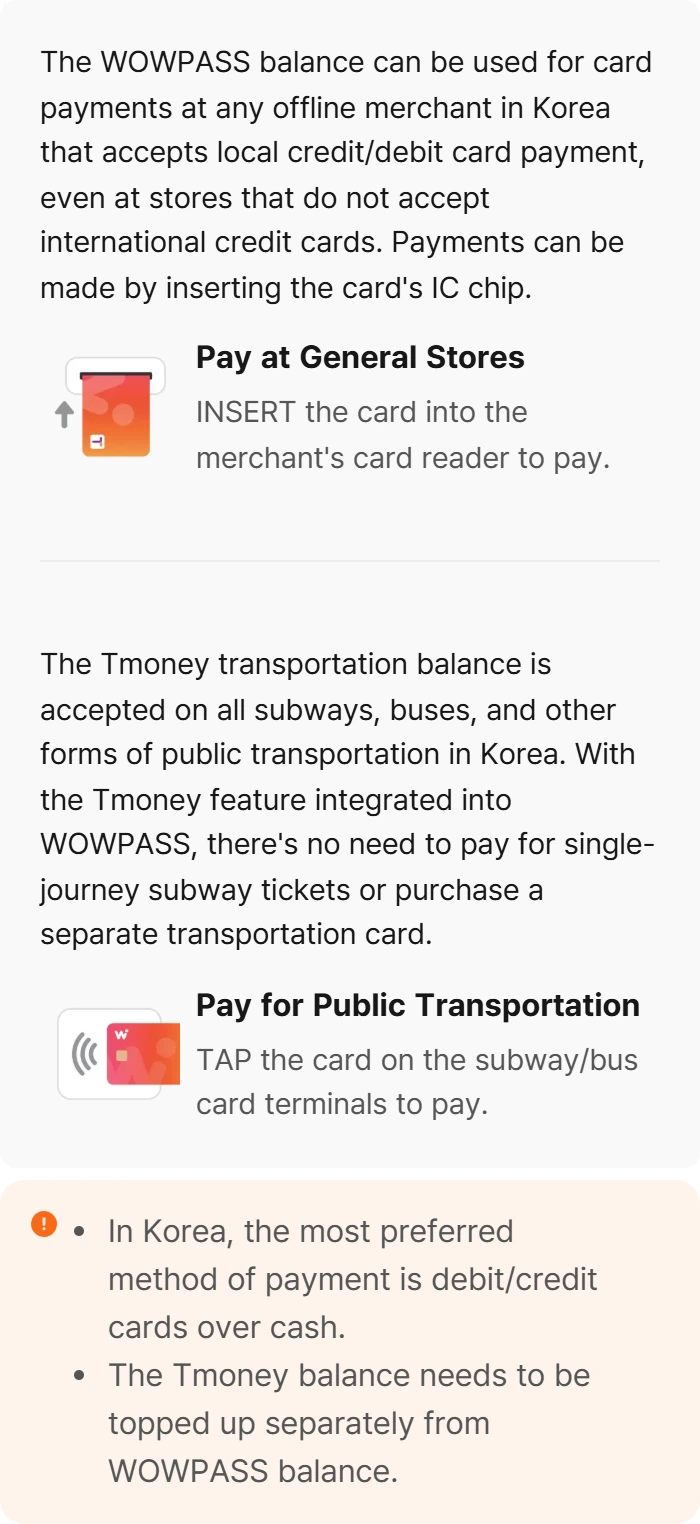
The official WOWPASS usage guide describes two different payment actions. General-store purchases use the WOWPASS balance and the card’s IC chip. Subway and bus gates use the integrated Tmoney transportation balance and a tap. The guide explicitly says the Tmoney balance needs to be topped up separately from the WOWPASS balance.
| Balance | Main job | How to pay | What to check |
|---|---|---|---|
| WOWPASS balance | Offline purchases where a local credit or debit card is accepted | Insert the IC chip into the merchant reader | Enough purchase balance, current merchant acceptance, and any top-up cost |
| Tmoney balance | Subway, bus, and other supported public transportation | Tap at the transit reader and follow normal tap-in and tap-out rules | Enough transit balance before entering; it is not automatically drawn from the WOWPASS balance |
A large shopping balance does not rescue an empty transit balance at a gate. Likewise, transit money is not your general shopping budget. Check both figures by name rather than looking at one total and assuming the card is ready.
Get and register the card
Start by installing the official app. On Google Play, the current listing is WOWPASS: Go Cashless in Korea by Orange Square, Inc. Match both the app name and developer before entering identity or payment information.
- Use the official app or website to find a current airport pickup point or WOW Exchange machine. Do not plan around an old blog map.
- Carry the same passport you will use for the trip. VISITKOREA’s transportation-card guide says a passport is required to buy WOWPASS at a kiosk.
- Check the current card price before purchase. VISITKOREA listed the physical card at KRW 5,000 when this guide was reviewed, but the official service should control on your purchase date.
- Activate and register the physical card in the app immediately. Confirm that the card number, WOWPASS balance, and Tmoney balance are visible before leaving the machine area.
- Save the official support route and one non-sensitive record of the card. Do not post the full card number, passport image, or verification screen in a public note.
Registration is not busywork. The official app listing says card ownership verification is needed for balance withdrawal or reissue, and the app provides card pause and unpause controls. Completing setup while the card and passport are in front of you is easier than discovering the missing step after a loss.
Load each balance deliberately
The official WOWPASS site currently advertises cash top-up in supported foreign currencies and mobile top-up through international cards or e-wallets. Availability and cost can differ by funding method, account, card issuer, and app version. Compare the amount of KRW that will actually arrive, not only the headline exchange rate.
| Before loading | Practical check | Reason |
|---|---|---|
| WOWPASS purchase balance | Estimate the next one or two days of offline spending | Avoid leaving a large unused balance or needing an urgent withdrawal |
| Tmoney transit balance | Load enough for the next route and keep a small buffer | Transit cannot rely on the general WOWPASS balance |
| Cash or mobile funding | Compare the final KRW received, fee, issuer charge, and exchange rate | Different top-up routes can have different total costs |
| Backup funds | Keep a second card and cash physically separate | A lost wallet or one failed app should not remove every option |
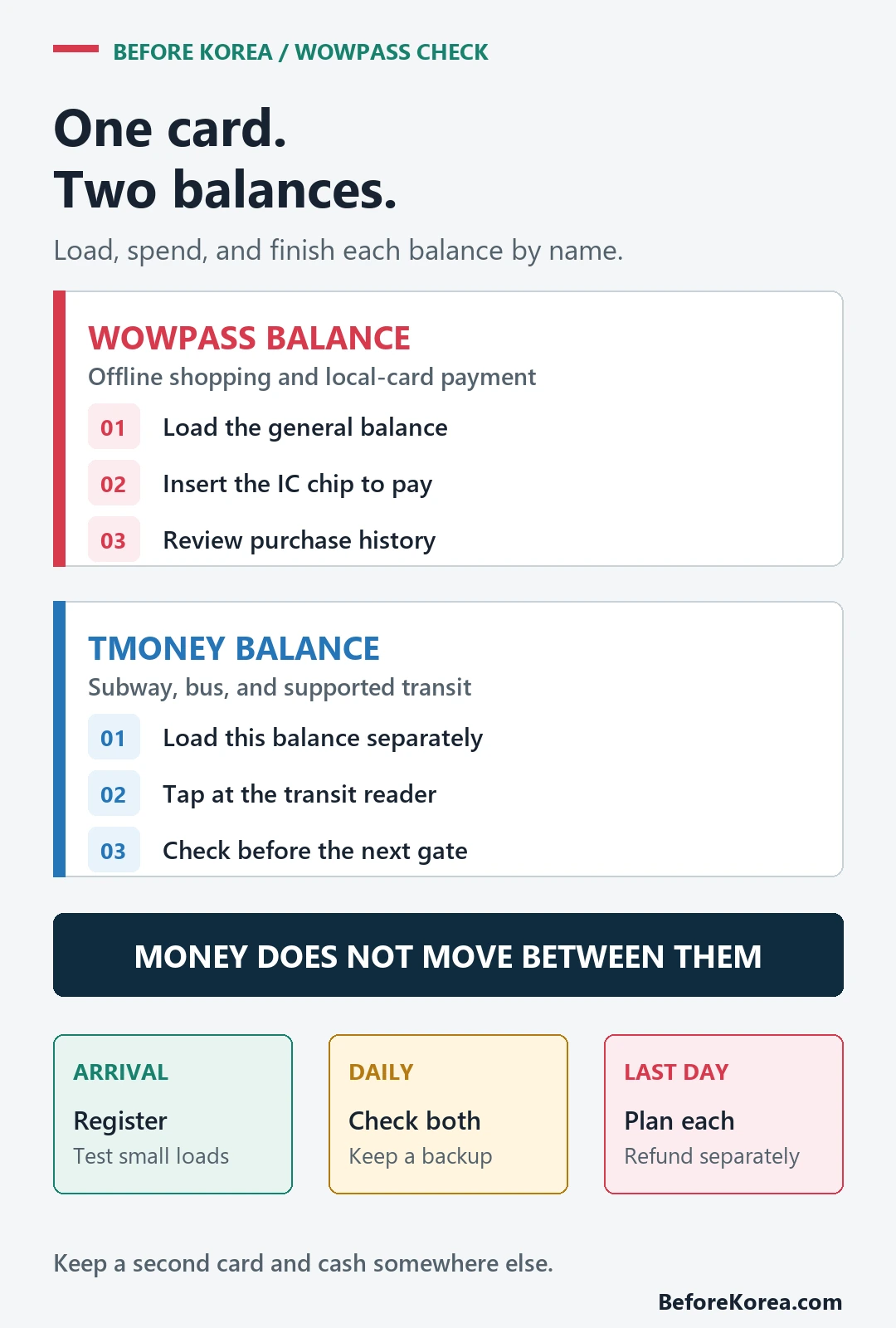
Start small. Make one modest top-up, confirm the named balance, and complete one low-risk purchase or ride. A successful test reveals more than loading the full trip budget based on a screenshot from someone else’s phone.
Before a large top-up, record the funding method, foreign-currency amount, quoted exchange rate, fee shown by the service, expected KRW, and final KRW received. Compare that result with what your own bank or card would charge for the same spending. This turns “the rate looked good” into a checkable total and gives you the details needed if a load is delayed or the credited amount is wrong.
Pay with the right motion
At a shop, insert the card’s IC chip when the merchant reader asks for a card. At a subway gate or bus reader, tap the card as a transportation card. These motions are not interchangeable, even though the same piece of plastic contains both functions.
| Moment | First action | If it fails |
|---|---|---|
| Convenience store, restaurant, or shop | Ask to pay by card and insert the chip | Check the WOWPASS balance, retry once with staff, then use another card or cash |
| Subway or bus | Tap using the Tmoney function | Check the Tmoney balance and resolve it before repeatedly tapping |
| Website or app checkout | Check the merchant’s actual visitor payment options | Do not assume an offline prepaid card must work online; use a supported foreign card or official counter |
| Deposit or high-value purchase | Ask about deposit release, refund timing, and card acceptance first | Use a payment method with records and enough remaining availability |
The official WOWPASS guide describes the general balance for offline merchants that accept local credit or debit card payment. That is a useful promise, but it is not permission to assume every online checkout, phone-verification flow, hotel deposit, rental, or recurring charge will accept it.
Keep an independent backup
Carry one foreign card that is not stored with WOWPASS and enough cash for a simple meal or ride. A backup should not depend on the same phone, app login, wallet, or funding bank. If all options disappear together, you did not build a backup; you built one larger point of failure.
- Keep the hotel name, Korean address, and support number available offline.
- Do not load emergency money into a product before confirming how you can retrieve it.
- For broader card, cash, and ATM planning, use the Korea payment guide.
- If an international card fails, follow the checks in the foreign card troubleshooting guide instead of repeatedly retrying.
Lock, recover, and document the card
The current official app listing says you can pause a lost card in the app, unpause it if recovered, and visit a WOW Exchange machine for reissue with the remaining WOWPASS balance when the required ownership verification is complete. Treat that as a recovery path, not a reason to carry no backup.
- Pause the card in the official app as soon as you are sure it is missing.
- Review the latest transactions and note the time and place of the last legitimate use.
- Use the app’s current machine map and official support instructions for reissue or withdrawal.
- Ask specifically how the WOWPASS and Tmoney balances are handled. Do not assume two separate balances follow the same recovery rule.
- Use your separately stored card or cash while the recovery is unresolved.
Plan the last day before departure
Check both balances at least one day before leaving Korea. Spend down the WOWPASS purchase balance on ordinary purchases you already intended to make. Keep enough Tmoney for the final airport or station route, then follow the current official refund or retention instructions for each balance.
Do not wait until the boarding gate to discover that withdrawal needs identity verification, a machine, a fee, or a separate procedure. The T-money tourist guide covers transport-card habits in more detail. Save receipts or app records for a failed refund, duplicate charge, or deposit until the amount is settled.
Use this ten-minute arrival setup
- Open the official app and confirm the developer and service URL.
- Issue or collect the card with your passport at a current official location.
- Register the card, complete required verification, and find the pause control.
- Load a small WOWPASS balance and a separate small Tmoney balance.
- Confirm which number belongs to shopping and which belongs to transit.
- Test one low-risk chip purchase and one normal transit tap.
- Store the backup card and cash away from WOWPASS.
Questions travelers ask
Can WOWPASS pay for the subway and bus?
Yes, through the card’s integrated Tmoney function. Load the Tmoney balance separately and tap as you would with a normal transportation card.
Does money in the WOWPASS balance automatically cover transit?
No. The official usage guide says the Tmoney balance must be topped up separately from the WOWPASS balance.
Can WOWPASS replace every foreign card?
No. Its general payment value is strongest at supported offline merchants. Online checkouts, deposits, app payments, and exceptional terminals may need another method, so keep a second card and cash.
Do tourists need a passport to get WOWPASS?
VISITKOREA’s current guide says a passport is needed to buy the card at a kiosk. Check the official app for the exact pickup or machine procedure you will use.
Is WOWPASS always cheaper than using my own card?
No universal answer is honest. Compare the final KRW received after top-up or exchange, any card-issuer cost, the purchases you will actually make, and the value of convenience. Test with a small amount before committing the trip budget.
Primary sources checked July 22, 2026: WOWPASS official service, official usage guide, official Google Play listing, and VISITKOREA transportation-card guide.