Google Maps works in Korea for place discovery, saved lists, broad orientation, and some route planning, but it should not be your only navigation app without a route test. Install Naver Map or Kakao Map before the trip, search the exact places you will visit, and compare the station exit, final walk, Korean address, branch, and building floor. The 2026 approval of Google’s detailed map-data export is important, but approval is not the same as a completed feature rollout on every phone.
This answer is deliberately conditional. Google Maps, Naver Map, and Kakao Map can change by app version, language, location, and data source. A screenshot from another traveler cannot prove what your phone will show on your travel date. The useful question is not simply “Does Google Maps work?” but “Does it give me a complete route to this exact door?”
What works now and what still needs checking
Start with Google Maps if its familiar interface helps you collect places, understand which neighborhoods are near each other, or share a list with companions. Then test the local execution details. Search results can identify a place while still leaving uncertainty about the correct branch, station exit, pedestrian approach, entrance, or floor.
| Traveler need | Google Maps can help with | Verify before relying |
|---|---|---|
| Building an itinerary | Saving attractions and seeing broad city layout | Opening hours, current branch, and the exact route in a local map |
| Finding a hotel | Recognizing the property and neighborhood | Korean road address, phone number, entrance, and airport-to-door route |
| Using subway or bus | Checking whether a route option appears on your device | Transfer, exit number, stop direction, and final walking segment |
| Finding a small business | Starting from an English name or shared link | Korean name, branch, phone, floor, and local-map pin |
| Giving a taxi destination | Showing the general place | Korean name or road address the driver or taxi app can match |
Do not turn that table into a fixed rule about which app always wins. A well-known attraction may be easy in every app. A recently opened cafe, clinic inside a larger building, or branch with a similar English name may require more checking. Use the app that gives the clearest evidence for the next physical action.
What Korea’s 2026 map decision actually changed
On February 27, 2026, a South Korean interagency council approved Google’s request to export government-supplied 1:5,000-scale map data under security conditions. The official government release says those conditions cover security-treated imagery, limits on coordinate exposure, domestic processing before export, and continuing compliance measures.
That decision removes a major policy obstacle. It does not, by itself, tell a traveler that walking, driving, business listings, entrances, and transit details have all reached the same level on every Google Maps app build. The government document is an export-permission decision, not a product release note or a promise about your travel date.
Use the announcement as a reason to test again, not as a reason to delete your backup. Google may improve features in stages, and local business data can still differ independently of the base map. An exact route comparison takes a few minutes and is more useful than assuming that old limitations or new headlines describe every current trip.
Run a three-minute route test before departure
Test the actual route you care about while you still have time to install another app and save Korean text. Use your own phone, current app version, and planned travel mode. A generic test between two famous landmarks is not enough if your real destination is a guesthouse, clinic, salon, restaurant branch, or event entrance.
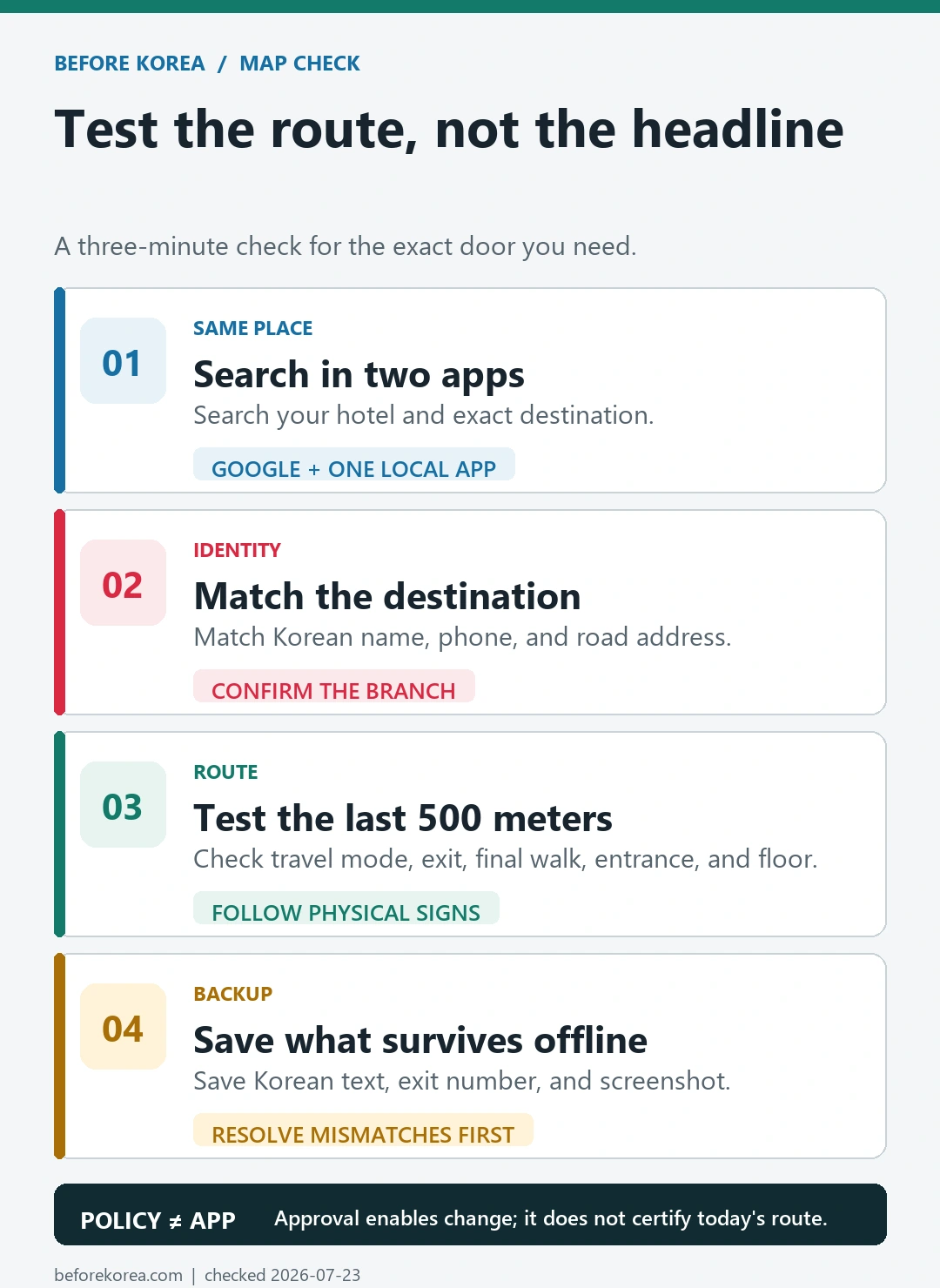
- Search your accommodation in Google Maps and one local map app.
- Match the Korean name, phone number, and road address rather than trusting a similar English label.
- Run one airport route, one subway or bus route, and one walking route to a real destination.
- Check whether the route names a useful station exit and whether the final segment reaches the correct side of the building.
- Save the Korean destination text and a screenshot that remains useful without mobile data.
Repeat the test for any appointment with a penalty for lateness. A route that is adequate for sightseeing may be too vague for a medical appointment, timed ticket, airport train, or restaurant reservation. When the apps disagree, treat the official venue page, booking confirmation, or direct phone confirmation as the identity check, then use the map for movement.
Use each map app for the job it does best
The Korea Tourism Organization’s 2026 transportation guide lists both Kakao Maps and Naver Maps as route-search tools for international visitors. Keep at least one installed and opened before arrival so you are not learning account, language, and permission settings while standing outside a station.
- Google Maps: useful when you already have saved lists, shared pins, familiar reviews, or a cross-country itinerary in one account. Test each Korea route rather than assuming the same feature depth you see at home.
- Naver Map: a strong first local check for Korean place names, branches, transit details, exits, and the final walk. Confirm the current language and app settings on your device.
- Kakao Map: a useful independent local search and route backup when a Naver result is unclear or when you want to compare a pin, stop, or walking approach.
You do not need to plan the whole trip three times. Use one app for the itinerary and one local app for verification. Open the third only when the first two disagree or a place is missing. This keeps the process fast without betting the day on a single database.
Let Korean names connect the apps
The most reliable bridge between map services is the destination’s Korean identity. English spellings can vary, two branches can share a brand name, and a translated category can look like a business name. Copy the Korean place name, road address, or phone number from the venue’s official page or booking confirmation and search that exact item in the local map.
| Save this | Why it helps | How to use it |
|---|---|---|
| Korean place name | Reduces spelling and translation mismatch | Paste it into Naver Map, Kakao Map, or a taxi app |
| Phone number | Often distinguishes branches with similar names | Compare it with the booking or official venue page |
| Road-name address | Identifies the building even when the business pin differs | Show or paste it when the name search is weak |
| Building and floor | A map pin normally stops at the building | Keep it in a screenshot or note for the final entrance |
| Station exit number | A wrong exit can put you across a large road or block | Follow station signs, then start the final walking check |
If the phone number or address differs between the booking and the map, stop before traveling. Check whether the business moved, whether you selected another branch, or whether the booking message is older than the listing. Do not solve an identity conflict by choosing whichever pin is closer.
Check the station exit and final 500 meters
Many Korea navigation mistakes happen after the correct train ride. Large stations can have many numbered exits, underground passages, elevators in different locations, and roads that are difficult to cross at street level. The nearest exit by straight-line distance is not always the best exit for luggage, a stroller, limited mobility, or heavy rain.
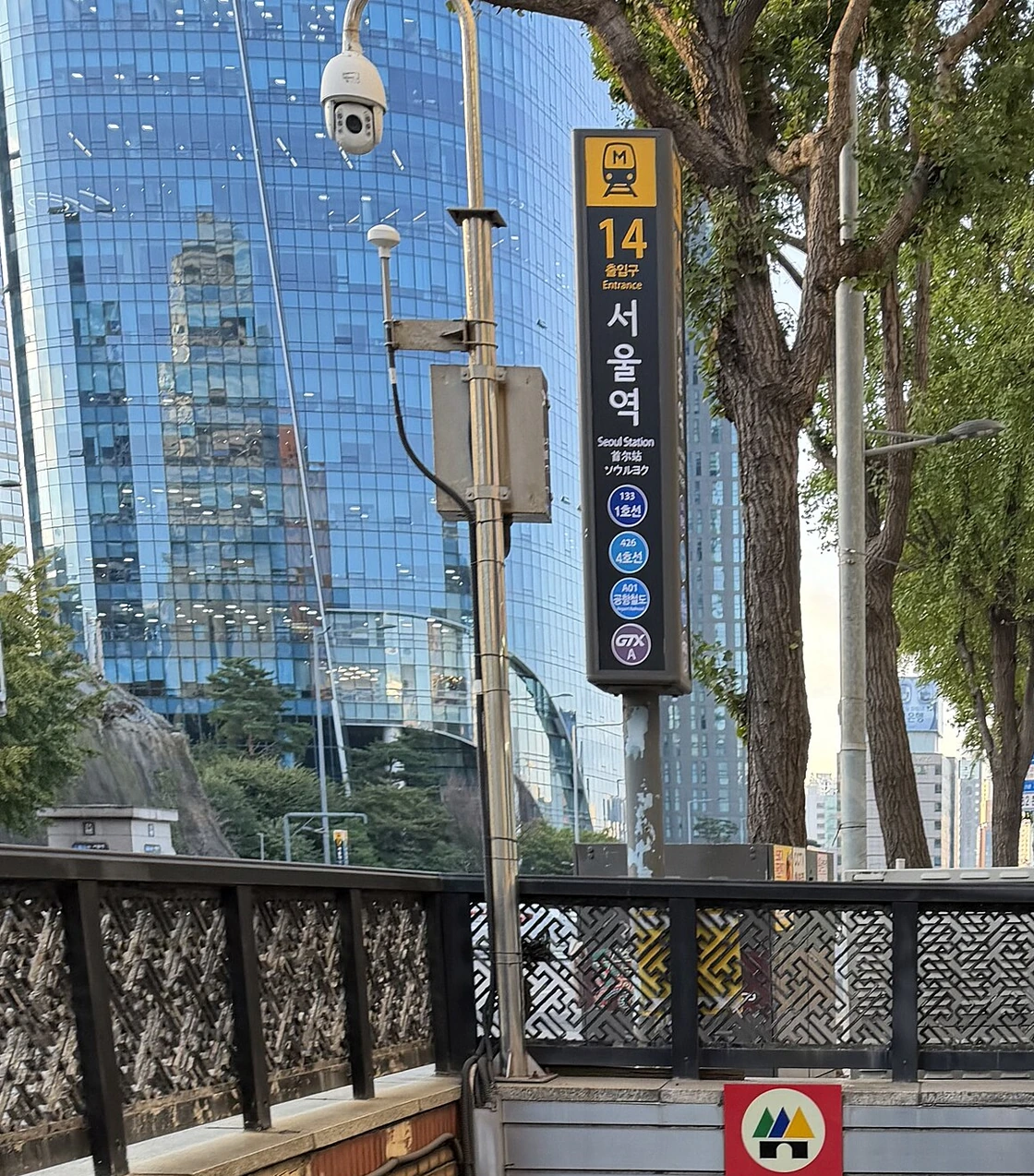

- Write down the exit number before the train arrives.
- Check whether you need an elevator or escalator rather than stairs.
- After reaching street level, confirm the direction with a building name, road, or intersection.
- For a multi-floor building, save the floor and unit separately from the map pin.
- Keep the destination name in Korean so staff or a taxi driver can identify it without translating your screen.
A local map route can still be wrong or temporarily outdated. Construction, a closed passage, or a relocated entrance can change the last walk. Follow physical signs and safety barriers over the line on the phone, and call the venue when the entrance cannot be found.
Recover when a place or route does not match
Google Maps finds the place but gives no useful final route
Copy the Korean name, address, or phone number into Naver Map or Kakao Map. If a mode is absent or the final segment is vague, switch apps rather than drawing your own path across unfamiliar roads.
Two apps show different branches
Compare the phone number, road address, and booking confirmation. Use the official venue or booking source to decide which branch is yours; the map is not the authority on your reservation.
The subway exit is different from your screenshot
Follow the current station signs. Exit closures and construction can invalidate an older screenshot. Choose another signed exit, then restart the surface route from your new position.
Mobile data or battery is failing
Use the saved Korean name, address, phone number, exit number, and route screenshot. A screenshot is a backup for identity and direction, not proof that the route is still open. Ask station or venue staff when conditions differ.
Test the workflow against common travel days
Airport arrival with luggage
Confirm the airport-to-hotel transport first, then the walk from the final stop to the entrance. Save the hotel name, Korean address, phone number, and check-in instructions. Do not assume a hotel pin shows the reception entrance.
Restaurant or cafe in a dense district
Match the branch and phone number before leaving. Check the floor and last order time on the current business source. In neighborhoods with alleys or several venues in one building, the pin is only the beginning of the search.
Clinic, salon, or timed event
Use the address in the appointment message, arrive with a time buffer, and keep a contact method that works in Korea. Test the route at the same general time of day when possible because transfers and service frequency can change.
Questions travelers ask about Google Maps in Korea
Does Google Maps work in South Korea in 2026?
Yes, it is useful for place discovery, saved lists, broad orientation, and whatever routes your current app provides. Test the exact route and keep Naver Map or Kakao Map for local verification rather than assuming every feature is complete.
Did Korea approve Google’s detailed map-data export?
Yes. The government approved the 1:5,000-scale export request on February 27, 2026 under security conditions. The approval enables improvement but does not certify a universal app rollout date.
Which map app should I install first?
Keep Google Maps if you already use it, and install Naver Map as the first local verification app. Kakao Map is a useful second local opinion when a result or route remains unclear.
Can I depend on an offline screenshot?
Use it to preserve the Korean name, address, phone number, exit, and planned path. Follow current signs and barriers when the physical route differs, because a screenshot does not update.
Official sources and related Before Korea guides
The Korean government’s February 27, 2026 map-export decision is the primary source for the approval and security conditions. The Korea Tourism Organization’s 2026 transportation guide lists Naver Maps and Kakao Maps as route-search tools. For product behavior, use Google Maps Help, the NAVER Map service page, and the KakaoMap service page.
Continue with Naver Map vs Google Maps in Korea, Best Korea Map Apps for Tourists, How to Use Naver Map in English, and Korea Subway and Bus Guide.
Sources checked July 23, 2026. Test the exact destination, route mode, station exit, and final walk on your own device close to departure. Map data, app features, language support, business listings, entrances, and construction conditions can change.