To use Naver Map in English for a Seoul subway exit, set the app language first, search the exact destination, open the public-transit route, and note the exit used for the final walking segment before you leave the train. Inside the station, follow the physical exit-number signs. Once you are above ground, let your location settle and check the street walk again. Save the destination’s Korean name and address as a backup.
This guide was checked on July 23, 2026. Naver Map menus, route details, and station information can change, so confirm the current app screen and the signs in front of you. A map route helps you plan; it does not override a closed passage, construction notice, or safety instruction at the station.
Set Naver Map to English before the trip
Install Naver Map from Google Play or the Apple App Store, then change the language while you still have stable internet. Naver’s current language-setting help gives this path on Android: MY profile icon, Settings, then Language. On iPhone, the same in-app route can send you to the device’s preferred-language setting.
English changes the interface, not every piece of local data. A restaurant name, building name, review, or small address detail may still appear in Korean. That is not a reason to abandon the result. It is a reason to save the Korean name beside the English one and verify the address before travel day.
Confirm the exact destination, not just the neighborhood
A station name only gets you into the right area. Before requesting directions, open the place result and compare the branch name, road address, neighborhood, phone number, and building name with your booking or message. This matters for clinics, hotels, restaurants, salons, and chains with several branches in one district.
- Hotel: match the Korean address and phone number, not only the English brand name.
- Clinic or salon: keep the branch, building, and floor from the appointment message.
- Restaurant or cafe: check the branch and nearby landmark before saving the first result.
- Private meeting point: ask for a Naver Map link or Korean place name when possible.
If two results look similar, do not choose by review count or photo alone. The right result is the one whose address and branch details match the information supplied by the destination.
Read the route as train, exit, and street walk
Open Directions, choose public transit, and read the route in three parts. First, confirm the line, direction, and transfer stations. Second, open the route detail and look for the station exit connected to the final walking segment. Third, inspect the first street-level turn from that exit to the destination.
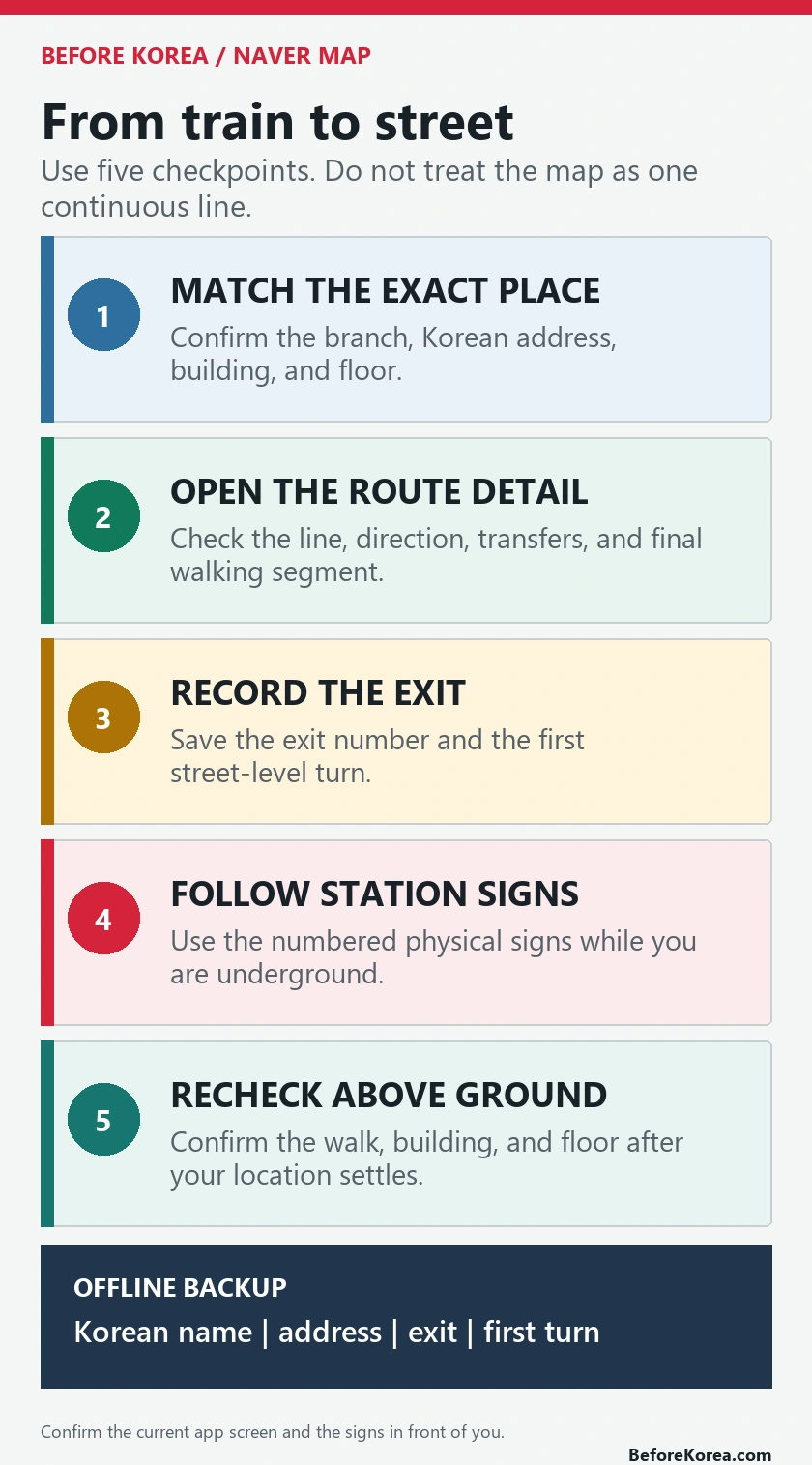
Naver’s public-transit directions help (Korean) says route results show the trip in separate walking, bus, and subway sections, together with information such as time, fare, and transfers. Use the section breaks instead of treating the route as one continuous blue line. The handoff from the subway section to the walking section is where the exit number matters.
- Confirm the exact destination and branch.
- Choose the public-transit route you intend to take.
- Open the detailed route before the train reaches your stop.
- Write down or screenshot the exit number and the first street-level turn.
- Confirm the final walk again after reaching the street.
Follow station signs before trusting the blue dot
If your location marker jumps, rotates, or puts you on the wrong side of the station while you are underground, stop using it as your only guide. Follow the numbered signs toward the exit you recorded. Exit signs are the physical link between the route in the app and the street outside.
Do not follow the arrow on your phone while standing still and turning in circles. Reach the correct exit first, go above ground, move to a safe place away from the stair opening, and then check the map again. Compare the first visible road, intersection, or building with the walking route before committing to a direction.
When English search does not find the right place
Switch from discovery to verification. Paste the Korean place name from the booking, search the Korean road address, or search a nearby station or landmark and inspect the surrounding map. A Korean phone number can also help distinguish branches when it appears on both the booking and the place record.
- Copy the Korean name exactly, including the branch suffix.
- Compare the district and road address with the reservation.
- Use the building or floor information to separate businesses at the same address.
- If the pin conflicts with instructions from the venue, ask the venue to resend its current map link.
The translation apps guide explains how to keep a Korean-text fallback without repeatedly retyping names. For a broader setup, use the Naver Map setup guide for visitors.
Save the parts you may need offline
Before leaving the hotel or boarding the train, save one compact arrival record. Include the Korean and English place names, Korean address, phone number if provided, station, exit number, building or floor, and a screenshot of the last walking segment. Keep it in your phone’s photo gallery, not only inside an app account.
Naver’s save-feature help (Korean) explains how signed-in users can save places and routes. That is useful for normal planning, but a separate screenshot remains valuable if the login, connection, or app screen becomes unavailable. Show the Korean address to station staff, a taxi driver, or the venue when spoken directions fail.
Do not assume the suggested exit is step-free
An exit number tells you where the route reaches the street. It does not by itself guarantee an elevator, a working escalator, or the easiest path for luggage, a stroller, or limited mobility. Naver’s map-home help (Korean) says indoor convenience facilities such as elevators can appear where data is available. Treat that as planning information and confirm with current station signs or staff.
Naver Map’s walking-directions help (Korean) also lists an avoid-stairs option, while warning that walking results can differ from current roads and crossings. If accessibility matters, allow extra time and choose a route you can verify on site rather than assuming the shortest route is usable.
A worked example: Hongik University Exit 9
Suppose the destination instructions say “Hongik University Station Exit 9.” Search the exact destination, open its public-transit route, and check that the last subway stop and final walk make sense. Before leaving the train, save Exit 9 and the first turn above ground. In the station, follow the yellow 9 signs rather than walking toward whichever exit is closest to the platform.
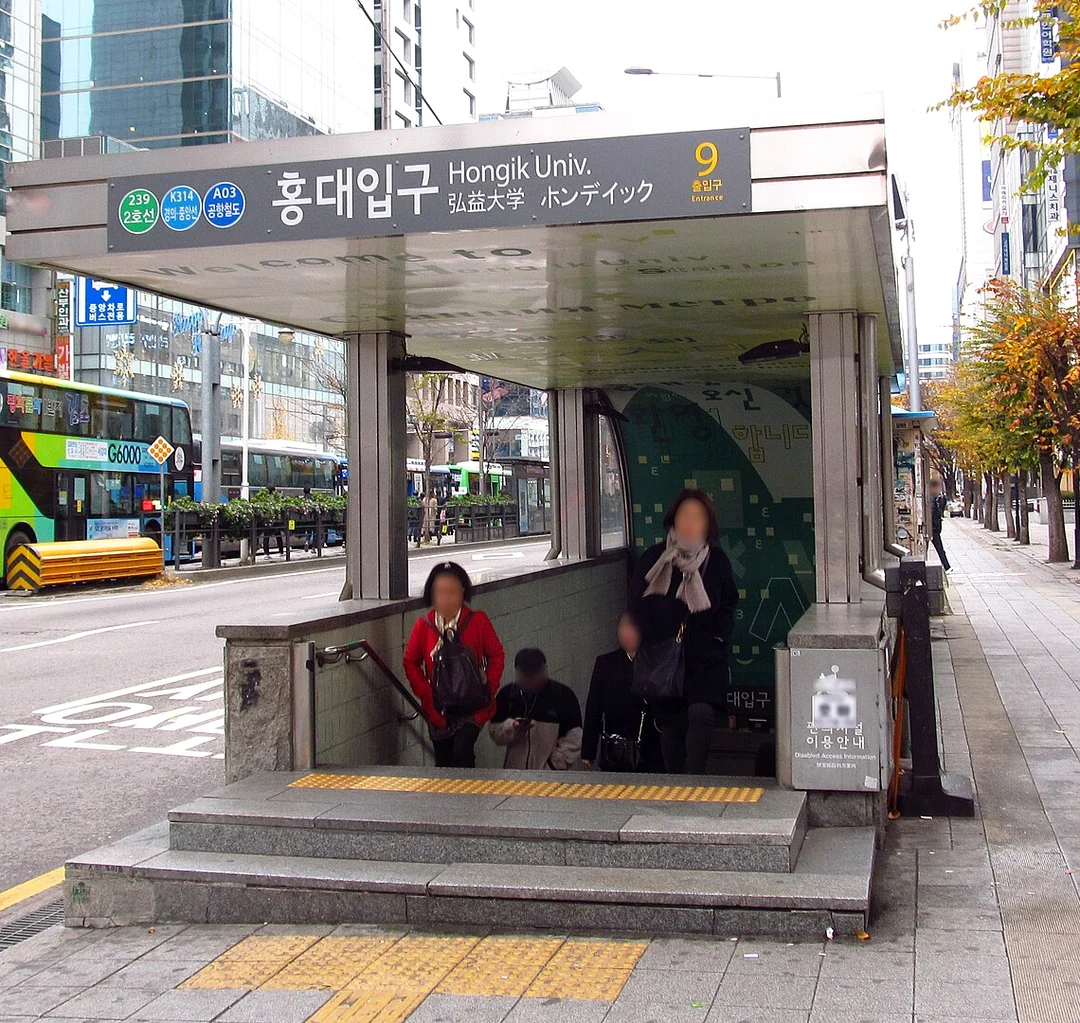

Photograph credit: Hongik-university-station-entrance-9-20181121-083316.jpg by LERK, from Wikimedia Commons. The photograph and the cropped, resized version shown here are shared under CC BY-SA 4.0.
The university’s current Seoul campus directions give a concrete example: Line 2, Hongik University Station Exit 9, followed by a nine-minute walk to the main gate. That instruction is for the university, not every Hongdae destination. A guesthouse or restaurant on another side of the station may require a different exit.
A public desktop-web search check by an AI on October 8, 2026 found the Seoul campus using both Hongik University and 홍익대학교. English autocomplete also offered Hongik University Station and other campuses. Switching languages therefore does not remove the need to identify the destination. For the Seoul campus, match 홍익대학교 서울캠퍼스 and 서울 마포구 와우산로 94 with the university’s official address.
Searching that road address in Naver Map opened an address panel containing several place cards, including the university and businesses. Use the address to narrow the area, then confirm the building or meeting entrance from the destination’s instructions. An address pin alone is not a specific campus-room or gate location.
Keep the arriving rail line with the exit note. The university lists Line 2, Exit 9 and a nine-minute walk to its main gate; for Gyeongui–Jungang/AREX, it lists Exit 4 and a 16-minute walk to that gate. Line 6, Sangsu Station, Exit 2 leads toward its back gate. Those are published campus directions, not universal Hongdae exits or measured travel times. This check tested desktop searches in a Korean interface; it did not test mobile app language settings, calculate a route or verify an open or step-free passage.
If the route looks wrong after you surface
Pause before adding more distance. Confirm that you emerged from the planned exit, then compare the destination address and first turn. If the walking line immediately asks you to cross a major road or circle back to the station, reopen the route from your current location. A changed entrance, construction barrier, or imprecise pin can make the original handoff less useful.
Naver provides a correction route for incorrect public-transit or walking information, but a report will not solve the current trip. For the immediate decision, use the verified address, visible street signs, a staffed information point, and the venue’s phone or message channel. The Korea subway and bus guide covers the wider transit workflow, while the Naver Map and Google Maps comparison explains when a second map view is useful.
Questions travelers still ask
Is Naver Map fully translated into English?
No. The interface supports English, but local place names, reviews, addresses, or building details can remain in Korean or mixed text. Save the Korean version of important destinations.
Will Naver Map always show the best subway exit?
Use the exit shown in the detailed route or station information as a planning checkpoint, then confirm it against physical station signs and the destination address. The most convenient exit can differ when construction, accessibility, luggage, or a changed entrance affects the walk.
Can I use Google Maps instead?
You can keep it as a second view, especially for saved international listings. For this workflow, keep Naver Map available and compare the exact Korean place record, transit detail, and exit before deciding.
What should I screenshot before entering the subway?
Save the destination’s Korean name and address, station, exit number, building or floor, and the first part of the street walk. The Korea travel apps checklist adds the broader offline and backup setup.
Official references and related Before Korea guides
Open Naver Map to test a real destination before departure. The linked Naver help pages cover language settings, map features, public-transit directions, walking options, and saved places. Hongik University’s directions provide the Exit 9 example. For adjacent decisions, read the Naver Map setup guide, map comparison, and Seoul subway etiquette guide.